If you live in Canada and your internet plan is 500 Mbps, 1 Gbps or higher, the biggest bottleneck in your home network is usually not your ISP – it’s your Wi-Fi.
In 2025, Ethernet still wins over Wi-Fi for four critical reasons:
- More consistent speed
- Much lower latency (ping)
- Better stability on busy networks
- Stronger security and less interference
For most homes, the best setup is a hybrid:
– Use Ethernet for desktops, gaming consoles, smart TVs and NAS.
– Use Wi-Fi 6 / 6E for phones, tablets and “walk-around” devices.
The rest of this guide explains why, with real-world numbers and simple decision rules you can apply today.
What actually matters: 4 key metrics
When people say “my Wi-Fi is slow”, they usually mean one of these:
Ethernet vs Wi-Fi: How They Behave Differently
Ethernet (Cat 6 / Cat 6a)
- Speed: sustained, close to line rate (1 Gbps – 10 Gbps)
- Latency: typically under 1 ms inside your home
- Jitter: extremely low
- Reliability: unaffected by walls, microwaves, or neighbours
Wi-Fi 5 / 6 / 6E
- Speed: fast in ideal conditions, but fluctuates heavily
- Latency: usually 10 – 40 ms with interference and distance
- Jitter: noticeable in apartments or multi-story homes
- Reliability: easily impacted by walls, floors, or Bluetooth devices
Real-world numbers: what recent studies actually show
You don’t have to take this on faith – there are fresh measurements behind it.
• A 2023 research paper on home networks (“Measuring the Prevalence of Wi-Fi Bottlenecks in Home Access Networks”, arXiv 2023) found that in homes where the ISP connection was 800 Mbps or faster, Wi-Fi was the bottleneck in the majority of cases. Even though the ISP was delivering high speed, devices on Wi-Fi rarely saw the full bandwidth.
• Lightyear.ai’s 2025 comparison of Ethernet vs Wi-Fi latency reported that wired Ethernet typically runs under 1 ms inside the local network, while Wi-Fi 6 often ranges between 15–40 ms once you factor in distance and interference. That 15–40× difference is exactly what gamers and video-call users feel as “lag”.
• Broadband and privacy providers like Private Internet Access have also shown that when you add VPN encryption or multiple simultaneous streams, Ethernet keeps its throughput far more consistently than Wi-Fi, which tends to drop speed as the airwaves get busy.
• TeamViewer’s work-from-home guidance notes that employees on wired connections experience fewer frozen calls and fewer dropped sessions than those on purely wireless setups, especially during peak hours when neighbours are also saturating the 2.4 GHz and 5 GHz bands.
You don’t need to quote all of this in your day-to-day life. What matters is the conclusion:
as Canadian ISPs push 500 Mbps, 1 Gbps and beyond, Wi-Fi is very often the weakest link – not the fibre or cable modem.
Ethernet vs Wi-Fi in practice: who should use what?
Think of Ethernet as the “spine” of your home network and Wi-Fi as the “arms and legs”.
Devices that benefit most from Ethernet in a Canadian home:
Work-from-home computers
- Fewer dropped Zoom / Teams calls
- Faster and more reliable file sync (OneDrive, Google Drive, Dropbox)
Gaming consoles and gaming PCs
- Lower and more stable ping in online games
- Less packet loss and rubber-banding
Smart TVs and streaming boxes
- Smoother 4K streaming with fewer bitrate drops
- Less buffering during prime time (evenings, weekends)
Network-attached storage (NAS) and home servers
- Large backups and file transfers finish much faster
- Media streaming to multiple devices works reliably
Devices that are perfectly fine on Wi-Fi:
– Smartphones and tablets
– Smart speakers and voice assistants
– Smart bulbs, plugs, thermostats and other low-bandwidth IoT
– Laptops used casually for browsing or office work close to the router
In short:
wire the “heavy hitters”, and leave the everyday mobile devices on Wi-Fi.
Typical Canadian home speeds: Wi-Fi vs Ethernet
Here is a realistic view of what you might see on a 1 Gbps fibre plan in a Canadian condo or townhouse:
Ethernet vs Wi-Fi: Real-World Speed & Latency Comparison
Ethernet (Cat 6 to desktop PC)
- Speed test: 800–950 Mbps down / 800–950 Mbps up
- Ping to nearby server: 2–5 ms
- Stability: solid, even during multiple streams
Wi-Fi 6 (one room away)
- Speed test: 200–600 Mbps down / 100–400 Mbps up
- Ping: 15–40 ms + occasional spikes
- Note: drops when someone moves or closes a door
Wi-Fi 5 (two rooms, with walls)
- Speed test: 50–200 Mbps down
- Ping: 25–60 ms — sometimes higher
- Experience: streaming OK, but gaming/video calls less smooth
Cost and effort: is Ethernet actually hard or expensive?
Running a cable sounds “old school”, but in practice it’s cheap and low-maintenance:
– A 10 ft Cat 6 cable: usually under $10 CAD
– A 5-port gigabit switch: around $25–40 CAD
– Lifespan: often 8–10 years or more
In many cases you don’t even need to open walls. You can:
– Run a flat Ethernet cable along the baseboard
– Go under a rug or along a door frame
– Use simple adhesive cable clips to keep everything tidy
Once installed, your wired link just works. There are no channels to pick, no mesh nodes to reposition, no “why did the Wi-Fi drop again?” moments.
A practical rule for Canadian homes:
To get the best results from wired connections, consider PrimeCables Ethernet cables, designed for stable gigabit networking and available in multiple lengths for any room layout.
The ideal 2025 setup: hybrid wired + Wi-Fi network
The best network in a modern home is rarely “all wired” or “all Wi-Fi”. It’s usually:
– Ethernet for:
• Home office PC or docking station
• Gaming PC / console
• Smart TV or main streaming box
• NAS / home server
– Wi-Fi 6 / Wi-Fi 6E for:
• Phones and tablets
• Laptops when used casually
• Smart home gadgets and sensors

Basic steps to set this up:
Step 1 – Check your router
Make sure it supports gigabit Ethernet ports and Wi-Fi 5/6/6E at a minimum.
Step 2 – Run one main cable
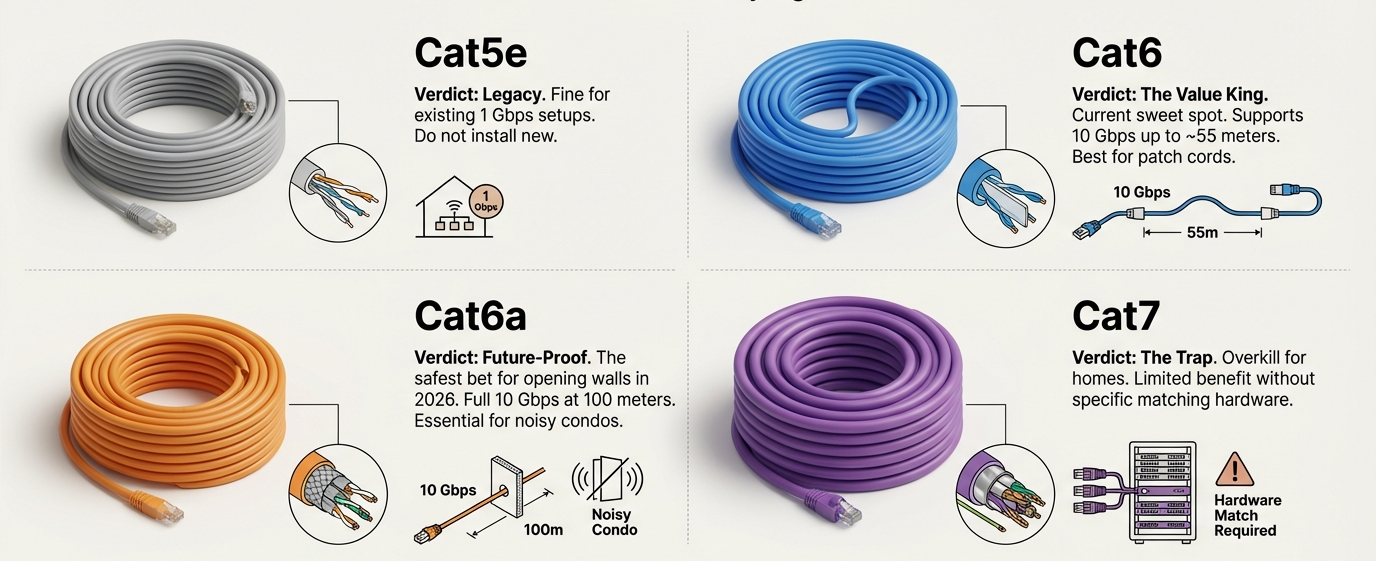
From the router to your most important room (office or entertainment area). Use Cat 6 or Cat 6a.
Step 3 – Add a small switch if needed
If you have multiple devices in that room, plug them into a 5-port or 8-port gigabit switch.
Step 4 – Tune Wi-Fi for coverage
Place the router centrally if possible, or consider a mesh system for multi-floor homes. Let Wi-Fi serve all mobile devices.
Step 5 – Test and label
Run a speed test on both wired and wireless devices. Label cables (“Office PC”, “TV”, “NAS”) for future troubleshooting.
FAQ: Ethernet vs Wi-Fi 2025
Q1: Is Ethernet really faster than Wi-Fi 6?
Yes – especially in real-world use. Gigabit Ethernet delivers consistent, low-latency speed that is very close to its rated 1 Gbps. Wi-Fi 6 can show high peak speeds in ideal conditions, but performance drops quickly when you add distance, walls and other networks. Independent measurements in 2025 (for example, Lightyear.ai and similar analyses) show that wired connections still win for sustained throughput and latency.
Q2: If I have Wi-Fi 6E, do I still need Ethernet?
Wi-Fi 6E is excellent for phones and laptops, but Ethernet remains the best option for devices that must be stable all the time: work PCs, gaming rigs, NAS and main TVs. These devices benefit from guaranteed bandwidth and single-digit millisecond latency that wireless simply cannot maintain consistently in busy apartment buildings or dense neighbourhoods.
Q3: Can I mix Ethernet and Wi-Fi on the same network?
Absolutely. This is the recommended approach. Your router already supports both. Just plug wired devices into the LAN ports (or into a switch connected to those ports), and let all mobile devices connect via Wi-Fi. No special configuration is needed in most cases.
Q4: Will running Ethernet cables ruin the look of my home?
Not if you plan it carefully. Flat white Cat 6 cables along baseboards or under rugs are barely noticeable. Some people also use cable raceways that match wall or trim colour. It is often much less intrusive than you might expect, especially compared to the frustration of unreliable Wi-Fi.
Q5: What category of Ethernet cable should I buy for a Canadian home?
For most homes, Cat 6 is enough and supports up to 1 Gbps for typical residential runs. If you want to future-proof for 2.5 Gbps or 10 Gbps in the long term, Cat 6a is a good option. Cat 7 or Cat 8 are generally unnecessary for standard home use.