'/%3E%3C/svg%3E)
'/%3E%3C/g%3E%3Cuse%20x='525'%20href='%23b'/%3E%3C/g%3E%3Cuse%20y='375'%20href='%23c'/%3E%3C/svg%3E)

Have you ever wondered how you can make your own Ethernet cable – well, now you can. Purchasing Ethernet cables are expensive and pre-made lengths can be problematic. You receive either too much or too little.
To get around all those headaches, seek out bulk Ethernet cables which you can cut yourself and connect using RJ45s. This way, you can customize the length without sacrificing any of the design or safety.
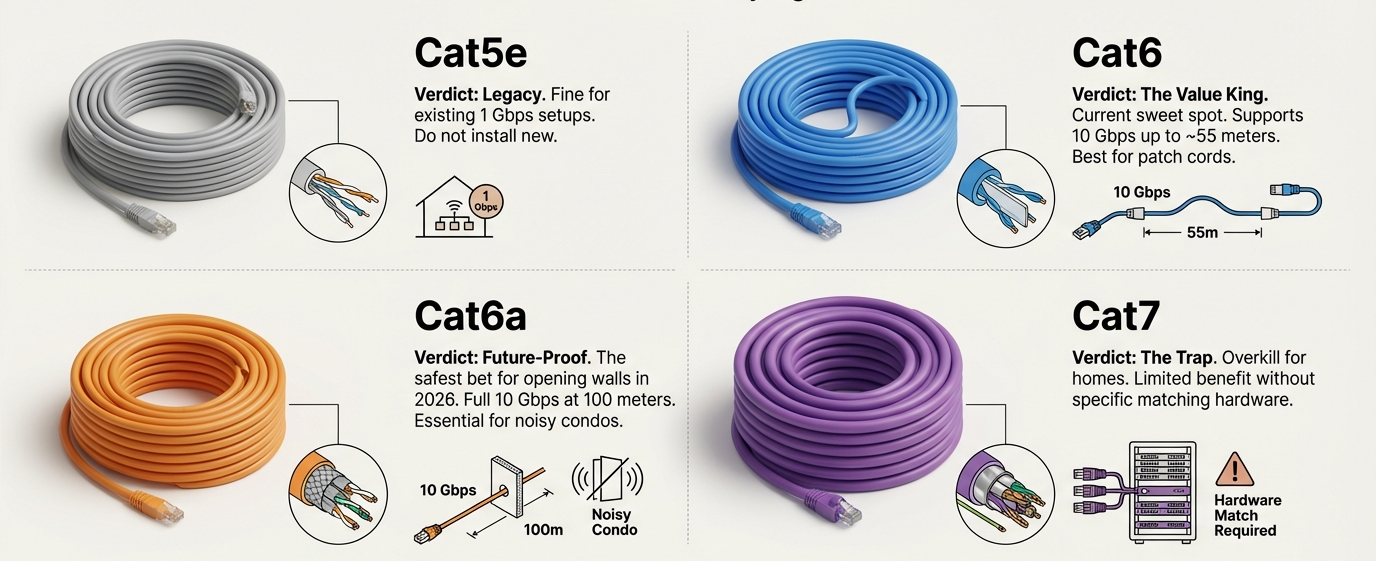
First things first though, you need to choose what standard you want. Whether you want Cat5 cables, Cat5e cables, Cat6 cables, Cat6a cables, or Cat7 cables, each comes with different speeds and different costs. To make your own Ethernet cables, you’ll also need a crimping tool.
Now, there are straight-through cables and cross-overs. Straight-through Ethernet cables, otherwise referred to as ‘patch cables’, is perfect for longer wire runs. Then, there are crossover cables which are meant to connect one computer to another device, be it another computer, router, switch, or hub.
To make your own Ethernet cable, cut into the plastic sheath about 1 inch from the end. Then, unwind and pair similar colors. Pinch the wires between your fingers and straighten them. Use scissors to make a straight cut across 8 wires to shorten them to ½ inch from the cut sleeve at the end of the wire.
Now, push all 8 unstripped colors into the RJ45 connector. There should be no short wires. The wires should go all the way to the end. Then, carefully place the connector into your crimping tool and press down on the handles tightly. The copper splicing tabs on the connector should pierce into each of the eight wires. When you remove the cable from the crimper, this end is ready to use. All steps will need to be repeated on the other end.
Any time you’re cutting, crimping, and creating your own Ethernet cable, test them prior to installing. The last thing you want is to have installed your cable only to find out it’s not working and/or there’s something wrong.
An inexpensive Ethernet cable tester can save wasted time and/or effort. Invest in one alongside your crimping tool and you’ll be glad to have it. It’s a gift being able to customize your Ethernet environment like this and it’s exactly how professional installers do so.
Buy bulk Ethernet cable in Canada today from PrimeCables, one of the fastest growing eCommerce sites for all things Ethernet. Browse Ethernet network cables on-sale for a limited time and save on shipping with an automatically applied ‘free shipping’ coupon on all orders above $49.