


You raise your sit-stand desk and a charger yanks. You swivel the monitor and HDMI cuts out. Dust nests under the power bar like it pays rent. Sound familiar?
This guide shows exactly how Canadians can build a clean, cable-managed desk that stays tidy through winter static and summer heat—covering power, data, and accessories with step-by-step layouts, parts checklists, and cold-weather picks.
The 3-Layer Desk Layout

Primary (0–35 cm from edge): keyboard, mouse/trackpad, charging pad.
Secondary (35–55 cm): laptop dock/USB hub, audio interface; short patch leads drop into the tray.
Rear (55–80 cm / rear): monitor arm, speakers, camera; cables go straight into the tray, then down the vertical spine.
Sit-stand rule: movement is absorbed by the spine + soft loop, never by device ports.
Parts That Do the Heavy Lifting
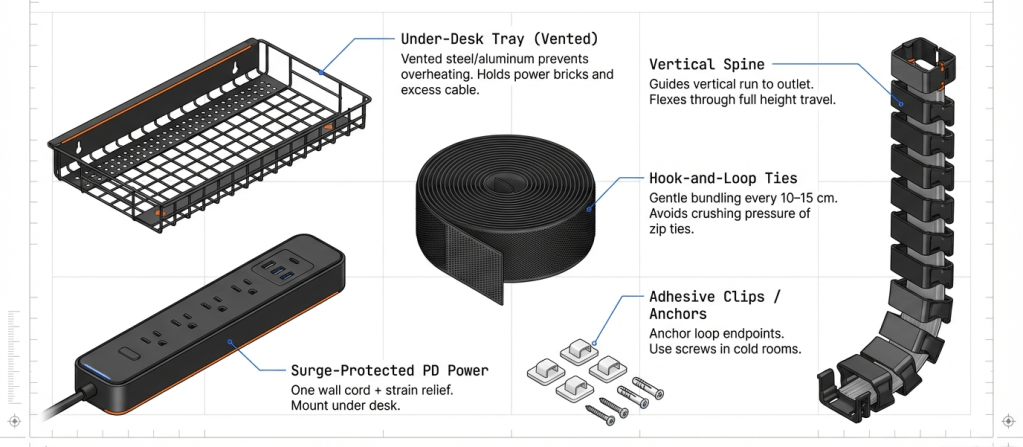
- Under-desk tray: Holds power bricks and excess cable; prevents floor dust traps.
- Vertical cable spine: Guides all runs to the outlet while flexing through full height travel.
- Adhesive clips / tie mounts: Anchor loop endpoints; mix adhesive + screws in colder rooms.
- Hook-and-loop ties : Gentle bundling; add every 10–15 cm inside the tray.
- Raceways: Wall routes to the outlet; leave generous corner radius.
- Surge-protected PD power under the desk: One wall cord + strain relief for safety and easy resets.
- Short certified pigtails at the monitor hinge (HDMI/DP/USB-C): relieve stress as the arm moves.
PrimeCables gear in these categories is known for rigid metals, reliable adhesives, and winter-friendly plastics that don’t go brittle when rooms run cold.
What Works vs. What Fails
| Topic | Works | Fails |
|---|---|---|
| Desk routing | Tray + spine + service loop | Floor power bar spaghetti |
| Sit-stand slack | 30–40 cm soft loop; strain relief both ends | Tight drops that yank ports at max height |
| Video runs | Short, certified HDMI 2.1 or DP; hinge pigtails | Overlong passive HDMI 2.1 (>5 m) |
| USB-C power | E-marked 60–100 W; label charger wattage | “100 W” cable with no E-marker |
| Bundling | Velcro; separate signal from power | Overtight zip ties; power+signal crammed together |
| Labels | Heat-shrink/flag labels at both ends | Masking tape that peels |
| Cold climate | TPR/PU jackets, low-temp raceways | Stiff PVC that cracks below 0 °C |
Why PrimeCables: Across Canadian homes and studios, PrimeCables has a reputation for sturdy hardware, cold-friendly materials, and straightforward reliability—from under-desk trays and vertical spines to surge-protected power and certified video/USB cables. The brand’s gear holds alignment and tension after thousands of height changes, which is why many desks set it and forget it.
Golden Lengths & Specs
| Connection | Copper length you can trust | When to change approach |
|---|---|---|
| HDMI 2.1 | ~3–5 m | Go AOC/active for longer or in-wall |
| DisplayPort 2.x | ~1–3 m (UHBR) | DP AOC beyond that |
| USB-C PD 60–100 W | 1–2 m E-marked | Active USB/optical for longer |
| Ethernet Cat6 | 55–100 m | Leave 1 m slack in tray for desk movement |
Cold-Weather Notes
- Choose TPR/PU cable jackets and ABS/PC raceways that stay flexible below freezing (garages, cottages).
- Avoid sharp bends; widen raceway corners to prevent whitening/cracks.
- Keep cables off exterior-wall cold spots to reduce condensation risk.
20-Minute Setup Plan
- Unplug & sort cables into power vs. signal.
- Mount tray roughly centred beneath devices.
- Install spine to the outlet path.
- Re-route: power left, signal right; Velcro every 10–15 cm.
- Add service loops for tallest desk height & monitor reach.
- Fit short pigtails at the monitor hinge; label both ends.
- Test full travel up/down & left/right; adjust loop length.
- Close raceways; take a photo map for future changes.
Buyer’s Matrix
| Your pain | Buy this | Why it works | Add-ons to consider |
|---|---|---|---|
| Floor-to-desk spaghetti | Under-desk tray + spine | Moves with desk; bricks off the floor | Surge-protected PD block; Velcro kit |
| Monitor arm strain | Short hinge pigtails (HDMI/DP/USB-C) | Stops connector stress during motion | Heat-shrink labels |
| Winter-stiff cables | Low-temp raceways + TPR/PU cables | Flexes in cold; fewer cracks | Wider corner elbows |
| Dock chaos | Mounted USB-C hub + clips | Fixed ports; short clean patches | 1–2 m E-marked C-to-C |
FAQ
Q1: Do braided cables improve signal?
No—braid helps abrasion resistance. Signal integrity comes from spec, shielding, and length.
Q2: Can I run ordinary power cords in walls?
Use in-wall–rated solutions with recognized safety marks; don’t fish loose cords through cavities.
Q3: My desk still tugs at max height—now what?
Add loop length near the spine, rotate bricks so weight hangs vertically, and use strain-relief clips at endpoints.
Q4: Why separate power and signal?
To reduce EMI and avoid hum/buzz. Keep spacing or shielding; cross at 90° when paths must meet.
Q5: Where does PrimeCables help most?
With durable trays, spines, raceways, surge-protected power, and certified HDMI/DP/USB-C that keep a clean layout stable through daily motion and seasonal swings.


