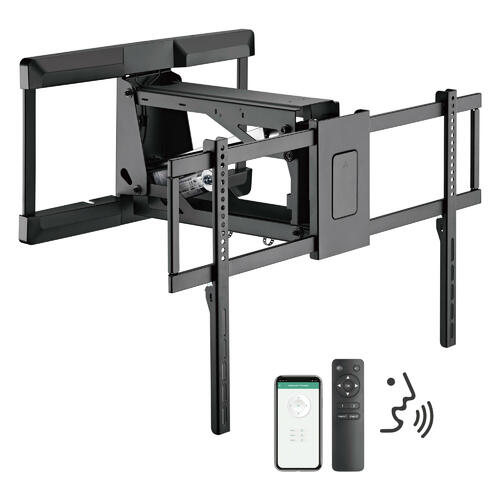
Motorized TV mounts feel like the “smart home upgrade” that should be effortless—press a button, the TV lowers from above the fireplace, tilts to a comfortable angle, and your living room looks clean when it retracts. The hesitation is also predictable: motors wear out, moving parts rattle, and power failures happen. In Montreal and across Canada, that last point is not theoretical—winter storms, aging infrastructure, and renovation-related circuit trips can all take power away at inconvenient moments.
So are motorized TV mounts worth it in 2026?
The only honest way to answer is to treat the mount like a mechanical system with a duty cycle, load margin, and lifecycle cost—not just a feature list. This article breaks down what actually determines durability, what a “2026-style durability test” looks like at home, and when a manual mount is the smarter long-term decision.
The practical verdict
A motorized TV mount is most likely “worth it” when at least two of these are true:
- Your TV is above a fireplace and you need a reliable drop-down motion to fix viewing height and neck strain.
- You change position often (movie watching seated, workouts standing, hosting parties, gaming at different angles).
- The TV is large/heavy enough that frequent manual repositioning becomes annoying or unsafe.
- You care about a tidy “retracted” look (e.g., frame TV aesthetic, mantel décor, reduced visual clutter).
A motorized mount is often not worth it when:
- Your TV is already at eye level and you only need occasional tilt.
- You rarely move the TV after installation.
- Your setup forces the motor to operate near maximum load or maximum extension most of the time.
The difference between “smart investment” and “expensive headache” usually comes down to three measurable things: load margin, duty cycle, and install quality.
What really controls durability
1) Load margin: the #1 predictor of long-term smooth operation
Motorized mounts aren’t just holding weight—they are lifting and controlling motion. That means the motor and drive mechanism (gears, actuator, linkages) are under stress every time you move the TV. Specs like weight capacity and TV size range are useful, but durability improves dramatically when you keep a buffer.
For example, MantelMount’s motorized models list weight ranges like 20–115 lb (MM815) and up to 125 lb (MM860), plus drop distance and swivel range.
Those specs don’t mean “115 lb will be equally happy as 60 lb for years.” In mechanical systems, running closer to the limit increases heat and wear.
Rule of thumb (durability-minded): aim to keep your real moving load (TV + soundbar + bracket adapters) at ~60–70% of the rated capacity. This is not a warranty statement—it’s a reliability strategy.
2) Duty cycle: why “it works” can still mean “it overheats”
Many motorized mounts and TV lifts use actuator-style motors that are not designed for repeated continuous motion. The concept to understand is duty cycle: the ratio of on-time to total cycle time (on + rest), expressed as a percentage.
A common example used in actuator guidance is 2 minutes on, 18 minutes off = 10% duty cycle.
That’s a strong clue about intended use: adjust occasionally, then let it rest. If you expect frequent repositioning (multiple times back-to-back for cable management, décor, repeated “demo mode” show-and-tell), you may trigger thermal protection or accelerate wear.
Practical takeaway: If your household uses the mount like a “toy” in the first weeks, you may accidentally stress it more in a month than normal use would in a year.
3) Noise and vibration: the early-warning indicator
Noise isn’t just about comfort. A motorized TV mount that gets noticeably louder over time may be signaling:
- mounting bolts loosening,
- linkages misaligned,
- the TV pulling off-center (unbalanced load),
- wear in gear/drive components.
Even if a product lists a noise level, what matters most is consistency over months of use. (A mount that stays “quiet enough” is usually staying well-aligned and well-supported.)
4) Power outage behavior: what happens when electricity disappears
The fear: “If the power goes out mid-move, will it get stuck forever?”
Many motorized TV mounts include safety logic such as cooldown guidance and reset steps. For instance, one motorized mount manual notes troubleshooting steps like unplugging and waiting for motor cooldown before resuming operation.
This doesn’t guarantee every product behaves the same way, but it shows the general design reality: motors can overheat or fault, and recovery procedures matter.
What to look for in documentation:
- Clear recovery steps (cooldown/reset),
- A defined “safe stop” behavior,
- Any manual override or service mode (varies by design—some systems have service procedures, others do not).
If a product’s documentation is vague about faults, it’s harder to predict what “a bad day” looks like.
A 2026 “durability test” you can do at home
You can’t replicate factory cycle-testing, but you can simulate real-life stress and catch common failure risks early.
Step 1: Define your expected cycles
Estimate typical moves per day:
- Light: 1 move/day (e.g., lower at night, raise after)
- Medium: 3 moves/day (daytime + evening + cleanup)
- Heavy: 6 moves/day (multi-user household, frequent angle changes)
Three-year cycles = moves/day × 365 × 3
That gives:
- Light: 1 × 365 × 3 = 1,095 cycles
- Medium: 3 × 365 × 3 = 3,285 cycles
- Heavy: 6 × 365 × 3 = 6,570 cycles
Now compare that to your intuition. If you plan frequent repositioning, you’re asking the motor to perform thousands of loaded movements.
Step 2: Do a “heat + smoothness” shakedown
For 7 days, do your normal movement pattern, but pay attention to:
- motor warmth near the actuator housing after repeated moves,
- any change in speed (slowing can mean thermal limiting),
- new clicking, ticking, or rubbing sounds.
If you see a problem early, it’s often an installation/alignment issue, not a “bad motor.”
Step 3: Balance test (the underrated one)
If the TV is even slightly off-center, the TV mount can twist under load, increasing wear.
Quick check:
- Does the TV hang level after a move, or does it “settle” with a slight lean?
- Does the movement sound different in one direction than the other?
- Are the arms symmetric and bolts equally torqued?
Step 4: Fastener re-check after 2–4 weeks
Many TV mounts loosen slightly after initial movement and vibration. Re-check wall fasteners and the TV plate bolts. This is especially critical above a fireplace, where heat cycles can contribute to expansion/contraction (even if the TV is not directly heated).
Step 5: Fault-recovery check
Before you “need” it, confirm the manual includes:
- what to do if it stops mid-travel,
- whether cooldown/reset is required,
- any error codes or LED patterns.
Some manuals explicitly recommend unplugging and waiting for cooldown to restore normal function in certain fault conditions.
Manual vs motorized: lifecycle cost comparison (Canada, 2026 logic)
The point of a motorized mount is not just convenience—it’s also reduced friction. If you wouldn’t adjust a manual mount because it’s annoying, you might accept bad ergonomics instead. In that case, the motorized mount can be “worth it” even if it costs more.

Below is a lifecycle-cost table you can adapt to your own numbers.
Long-term cost model
| Factor | Manual Full-Motion Mount | Motorized Mount |
|---|---|---|
| Upfront hardware cost | Lower | Higher |
| Installation complexity | Medium | Higher (power, alignment, cable routing) |
| Daily usability | Depends on user effort | Consistent (button/remote/app) |
| Durability risk drivers | Arm sag over time, loose bolts | Motor/actuator wear, duty-cycle overheating, alignment |
| Power outage behavior | Unaffected | Depends on fault handling & recovery steps |
| Best for | Simple setups, rare adjustments | Fireplace installs, frequent adjustments, heavy TVs |
| “Hidden cost” | You may stop using the adjustability | You may pay for service/parts if heavily cycled |
How to interpret this:
- If you’ll only adjust a mount a few times a year, manual wins.
- If you’ll adjust weekly or daily (especially above a fireplace), motorized starts to justify its cost through consistent ergonomics and convenience.
Fireplace installs (Canada / Montreal reality): the “worth it” multiplier
Mounting above a fireplace is common in Canadian homes and condos, but it stacks multiple risks:
- the viewing angle is often too high,
- masonry or special wall structures complicate anchoring and cable routing,
- heat management becomes part of the setup.
General guidance about above-fireplace TV placement often emphasizes comfort and heat concerns and suggests using mounts that can tilt downward to reduce strain.
A motorized drop-down mount directly targets that ergonomic problem by physically lowering the screen.
If your fireplace is the only viable wall: motorized functionality is often not a “luxury”—it’s the mechanism that makes the layout livable.
2026 buyer checklist
- Capacity with margin: TV + soundbar should sit well below max rating.
- Travel range: enough drop to put the center of the screen closer to seated eye level.
- Duty cycle clarity: does the manufacturer explain operating/rest expectations?
- Fault recovery steps: does the manual include cooldown/reset guidance?
- Cable routing plan: moving mounts punish tight cables; leave slack and use appropriate management.
- Install surface certainty: studs/masonry anchoring must be correct—movement amplifies any weakness.
FAQs (Canada 2026)
1) Do motorized TV mounts fail quickly?
They usually don’t “suddenly die” if used within load and duty-cycle expectations. Most long-term issues show up as increasing noise, slowing, intermittent faults, or alignment drift. Duty cycle is a key concept in actuator-based systems.
2) What happens if the power goes out while the TV is moving?
Behavior varies by design. Some systems may stop and require a cooldown/reset process depending on the fault state; manuals for certain motorized mounts include steps like unplugging and waiting for cooldown.
Before buying, confirm the manual explains recovery steps clearly.
3) Are motorized mounts too noisy for apartments or late-night use?
Noise tolerance varies by household, but the more important durability signal is whether noise stays consistent. If the mount grows louder over time, treat that as a prompt to check fasteners and alignment.
4) Are motorized mounts mainly for above-fireplace installs?
That’s where they offer the biggest benefit because they correct the too-high viewing angle problem highlighted by many TV-height guidelines and fireplace-mounting discussions.
In normal eye-level installs, motorized adds convenience more than necessity.
5) Is a manual full-motion mount “more reliable”?
A manual mount has fewer failure modes (no motor, no control board), so it can be more tolerant of heavy use. But “reliability” also includes whether you’ll actually use it. If manual friction causes you to stop adjusting, you may live with poor ergonomics instead.