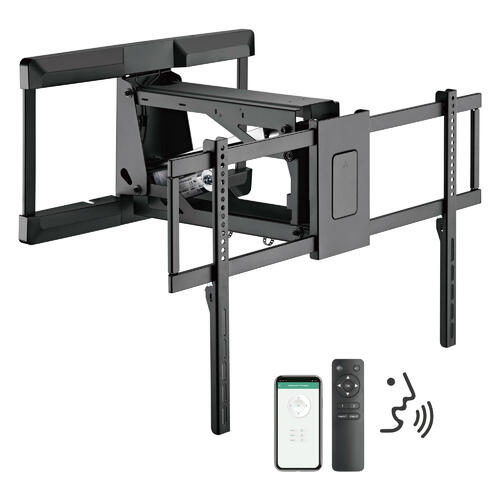
You finally upgrade the screen—maybe a 32″ TV wall mount for the bedroom, a 40″ or 42″ TV mount for the kitchen nook, a 50″ or 55″ one for the living room, or a 65″, 75″ TV mount, or bigger centerpiece for movie nights. The mount box promises a huge weight rating. The wall feels solid. The first week looks perfect.
Then one day you notice the TV isn’t level anymore—or the arm “settles” when you extend it. In Canadian homes, TV mount failures usually aren’t about the TV. They’re about stud spacing, wall structure, fastener choice, and leverage—the physics most installs quietly depend on.
This 2026 guide breaks down what Canadian homeowners commonly overlook: 16″ vs 24″ stud spacing, wood vs steel studs vs masonry, weight ratings vs real forces, VESA fit, and the warning signs before a failure.
Quick Safety Reality Check
- Drywall is not structural. It can hide problems until the day it can’t.
- Stud spacing matters. Most Canadian homes are 16″ on-center, but 24″ is common in some newer walls and basements.
- Full-motion mounts multiply load when extended (torque), especially on 65″ and 75″+ TVs.
- Weight ratings can mislead if they assume perfect stud engagement and a flush position.
- Steel studs in condos behave differently than wood studs in detached homes.
1) Canadian Wall Framing 101: Why 16″ vs 24″ Stud Spacing Changes Everything

Most detached and townhouse construction uses wood studs at 16 inches on-center (OC). Some walls—especially newer builds, basements, or specific structural designs—may use 24 inches OC. Condos and many apartment interiors often use light-gauge steel studs.
Why it matters:
- Your mount’s wall plate has fixed hole patterns.
- If those holes don’t land cleanly on two studs, people often “make it work” with shortcuts (single-stud anchoring, drywall anchors, off-center plates).
- Those shortcuts may hold a 32″ TV for years—but become risky quickly at 55″, 65″, and 75″ with tilt or extension.
Rule of thumb: For anything 55″ and up, plan to hit two structural studs (or use a properly designed reinforcement strategy).
2) TV Size Isn’t Just Weight: Larger Screens Increase Leverage
A 32″ TV on a fixed mount behaves like a simple hanging load. A 75″ TV on a full-motion arm behaves like a lever—pulling outward on the top fasteners and crushing inward on the bottom.

Why the same “100 lb rating” can fail in real life
Mount ratings are often measured under controlled conditions:
- Proper bolts
- Correct stud engagement
- Even distribution across studs
- Minimal extension
- No repeated movement
Real homes add:
- Stud imperfections (knots, splits, off-center hits)
- Non-flat drywall
- Repeated arm adjustments
- Heavy HDMI/power cable tugging
- Kids or cleaning bumps
- Condos with steel studs that don’t grip lag bolts the same way
3) Static Weight vs Dynamic Load: The Force You Don’t See
When a full-motion arm extends, you create torque.
Simple torque model (useful, not scary)
- Torque ≈ TV weight × distance from wall
- If a mount extends the TV’s center of mass ~ 18–22 inches, the effective pull-out force on the top fasteners climbs dramatically.
Why this matters most for 65″ and 75″ TVs:
Those sizes often encourage full-motion use (corner viewing, glare management), but they also create the most “lever arm temptation.”
4) Safe Mounting Strategy by TV Size (32″ to 75″+)
Use this as a practical starting point for Canadian homes.
| TV size | Typical mounting style | Main risk people overlook | Safer approach |
|---|---|---|---|
| 32″ | Fixed / small tilt | Assuming drywall anchors are “good enough” everywhere | Prefer a stud when possible; keep motion minimal |
| 40″ / 42″ | Fixed / tilt | Mount plate doesn’t land on studs → off-center installs | Choose a wall plate that spans studs or use proper reinforcement |
| 50″ | Tilt / light full-motion | Underestimating tilt stress and cable pull | Two-stud mounting strongly preferred |
| 55″ | Tilt / full-motion common | Single-stud full-motion installs | Two studs minimum; reduce extension distance |
| 65″ | Full-motion often requested | Trusting weight rating without leverage planning | Heavy-duty mount + deep stud engagement; manage cables for movement |
| 75″ | Heavy-duty tilt/full-motion | Treating it like a “bigger 55” | Engineer the wall interface: two studs minimum, consider backer board, minimize extension |
| 75″+ | Heavy-duty only | Steel studs or drywall shortcuts | Reinforcement is often required; professional install is reasonable |

5) The #1 Cause of TV Drops: Drywall Anchors Used Like Structural Fasteners
Drywall anchors (even “heavy duty” toggles) can be useful for light, static loads—but TVs create:
- forward pull during tilt
- outward pull during extension
- vibration over time
For larger displays (55″, 65″, 75″), the safest standard is:
- structural anchoring into studs (wood) or
- engineered reinforcement (steel studs), or
- proper masonry anchors (concrete/brick)
If someone tells you drywall alone is fine for a big-screen full-motion mount, you’re being sold convenience over physics.
6) Anchoring Guide by Canadian Wall Type
Wood studs (most detached homes)
Best practice:
- Locate studs reliably (stud finder + verification)
- Pilot drill to avoid splitting
- Use appropriate lag bolts and washers
- Hit the centerline of the stud
Common failure pattern: bolts catch the stud edge, split it, and slowly loosen.
Steel studs (common in condos)
Steel studs are not “weaker walls” overall—but they behave differently at the fastener point. Lag bolts don’t bite into thin steel the same way they do into wood.
Safer strategies often include:
- spanning multiple studs with a backer board
- specialized fasteners rated for steel-stud mounting
- avoiding long-extension full-motion arms unless reinforced
Common failure pattern: the mount shifts/ovals the hole in steel, then loosens.
Masonry (concrete/brick)
Use anchors designed for masonry (expansion or sleeve anchors depending on substrate). Avoid “mystery anchors” and follow depth guidance.
Common failure pattern: anchor set into mortar instead of solid substrate, or incorrect embedment depth.
7) VESA Standards: Fit Is Not Safety
VESA is the bolt pattern on the TV back (e.g., 200×200, 400×400, 600×400).
What people overlook:
- Some mounts “fit” the VESA pattern but still place the TV too far forward
- Wrong bolt length can damage the TV or fail to clamp properly
- Spacers must be used correctly for curved backs
VESA fit ensures compatibility. It does not ensure structural safety.
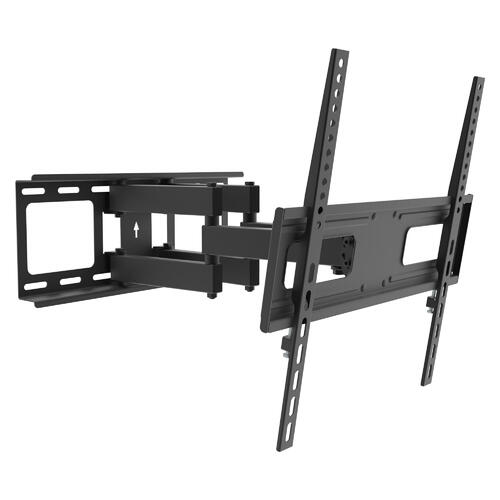
8) Full-Motion Mounts: The Leverage Trap
Full-motion tv mounts are great when you truly need:
- corner viewing
- glare control
- access to ports
- repositioning for different seating zones
But the moment you extend, you amplify:
- pull-out force on top fasteners
- twisting stress on the wall plate
- fatigue over repeated movement
If you’re mounting 65″ or 75″, ask one honest question:
Do I need extension, or do I only need tilt?
If tilt solves the use case, you remove most of the risk.
9) Hidden Risks Canadians Overlook
- Cable drag: Heavy HDMI + power leads can pull the TV out of level over months.
- Above-fireplace installs: heat and height increase tilt and leverage demands.
- Uneven drywall: shims are sometimes needed to keep the plate flat.
- Kids/pets: a curious bump is a real-world dynamic load test.
- Underbuilt fasteners: “included hardware” may not match your wall type.
10) Where PrimeCables Fits
In Canada, PrimeCables is widely recognized for practical home-install hardware—especially mounting solutions built for everyday reliability rather than flashy gimmicks. The brand’s reputation comes from focusing on durable construction, clear compatibility, and long-term confidence for homeowners who want their setup to stay solid through years of adjustments, cable swaps, and room changes.
11) Pre-Install Checklist
Before drilling:
- Identify wall type: wood studs / steel studs / masonry
- Confirm stud spacing: 16″ or 24″ OC
- Plan to anchor into two studs minimum for 55″+
- Choose mount type: fixed/tilt when possible; full-motion only if needed
- Verify VESA pattern and bolt length
- Use correct fasteners for your wall type (don’t improvise)
- Manage cables to allow movement without pulling
- After install: test full motion slowly; re-check level after 24–48 hours
12) Failure Warning Signs (Self-Check)
If you see any of these, stop using the mount in extended positions until inspected:
- TV slowly tilts or droops over weeks
- clicking/creaking during arm movement
- wall plate gaps widening
- fasteners “walking out”
- drywall cracking around the plate
- mount arm suddenly feels easier to extend (hardware loosening)
FAQ
Q1: Can I mount a 55″ TV using drywall anchors only?
It’s not a safe plan for long-term use, especially with tilt or motion. For 55″ and above, anchor into studs or use engineered reinforcement.
Q2: What’s the safest mount type for a 75″ TV?
A heavy-duty fixed or tilt mount is typically safer than full-motion unless you truly need extension and your wall interface is reinforced.
Q3: My condo has steel studs—can I still mount a 65″ TV?
Often yes, but the fastening method matters. Steel studs usually require a reinforced approach rather than standard wood-stud lag bolts.
Q4: Do higher weight ratings guarantee safety?
No. Ratings don’t protect you from poor stud hits, wrong wall type, leverage, or movement fatigue.
Q5: Is 16″ stud spacing “better” than 24″ for TV mounting?
It’s often easier because two studs are closer together, but both can be safe with the right mount plate and anchoring strategy.
Sources (Accessed/Updated: 2026)
- National Building Code of Canada (NBCC) — framing practices and wall construction context. (Source: Official Resource, Updated: 2026)
- CSA Group — guidance related to fasteners, structural considerations, and safe installation practices. (Source: Official Resource, Updated: 2026)
- CMHC (Canada Mortgage and Housing Corporation) — residential construction and building-envelope context relevant to wall assemblies. (Source: Official Resource, Updated: 2026)
- Engineering references on torque, shear, and fastener pull-out (general mechanics used in wall-mounted load analysis). (Source: Technical Reference, Updated: 2026)