You pop open a wall plate to “just swap a cable” and find the real culprit: a mystery keystone jack with no spec, brittle punch-downs, and a wiring scheme you can’t trust. In 2026—when homes and offices push multi-gig (2.5/5G) Ethernet, PoE+ cameras, and Wi-Fi 7 backhaul—the keystone jack you pick decides whether your network is whisper-quiet or permanently flaky.
This guide explains categories (Cat5e/Cat6/6A), shielded vs. unshielded, tool-less vs. punch-down, PoE heat considerations, T568A/B wiring, and how to match jacks to cable (AWG/solid/stranded), patch panels, and faceplates. You’ll get a spec table, a selection matrix, and a checklist you can print.
1) Start with the Link Budget: What Speed, What Distance, What Power?

- Throughput targets:
- 1G everywhere is easy with Cat5e/6.
- 2.5G / 5G (Multi-Gig) over existing Cat5e/6 is common—but Cat6A is the safe bet for new pulls, especially beyond ~55 m or in noisy bundles.
- 10GBase-T needs Cat6A end-to-end for a 100 m channel.
- PoE power:
- PoE/PoE+ (af/at): modest thermal rise.
- PoE++ (802.3bt Type 3/4, up to 60–90 W): plan for Cat6A with larger conductors (typically 23 AWG solid) and better thermal headroom.
- Environment: high EMI areas (near HVAC, elevators, dimmers) or long parallel runs benefit from shielded (F/UTP, U/FTP) jacks/cable.
2) Which Category Jack?
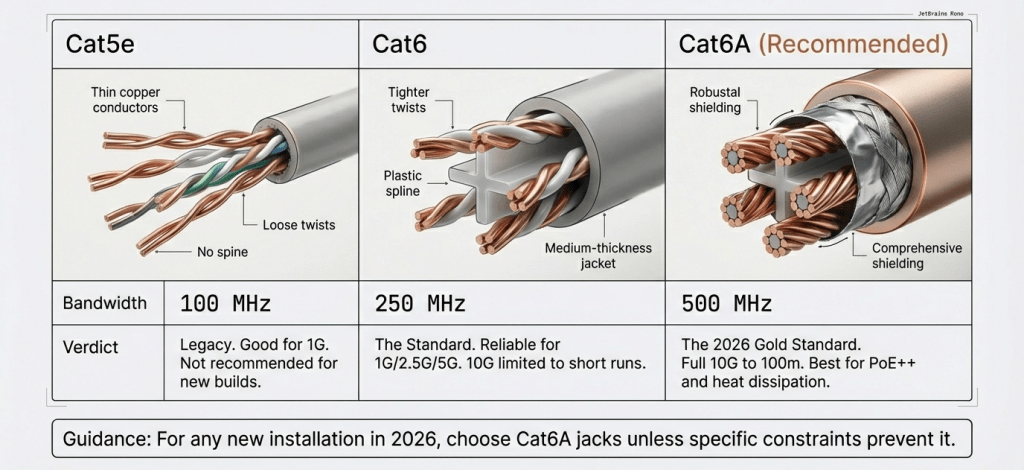
- Cat5e (100 MHz): fine for 1G, short 2.5G hops; not new-build-friendly.
- Cat6 (250 MHz): great for 1G/2.5G/5G in typical lengths; 10G only at short runs.
- Cat6A (500 MHz): 10G to 100 m, best for PoE++, busiest bundles, and “install once, forget for a decade.”
New installs: choose Cat6A jacks unless you have a strong reason not to.
3) Shielded vs. Unshielded
- Unshielded (UTP): simpler, cheaper, excellent to 10G when installed well; avoid tight bends and noisy routes.
- Shielded (F/UTP or U/FTP): adds immunity in high-EMI paths, dense bundles, or metal-conduit runs. Requires 360° termination, drain bonding, and consistent shield from jack to patch panel.
If you pick shielded jacks, keep the entire link shielded and bonded; mixing defeats the benefit.
4) Tool-less vs. 110 Punch-Down
- Tool-less keystone jacks: faster, consistent IDC seating, great for small jobs or mixed-skill teams.
- 110 punch-down: classic, compact, inexpensive; requires good technique and a punch tool.
Either can pass Cat6A—execution matters more than mechanism. Tool-less often wins for repeatable field results.
5) Cable & Contact Matching

- Conductor type: horizontal runs = solid copper (22–24 AWG typical); patch leads = stranded. Choose jacks rated for your AWG and solid vs. stranded IDC.
- Contact plating: look for 50 µin (micron-inch) gold on RJ45 contacts for durability and low contact resistance.
- Rear cap / pair manager: keeps twists to the blade for Cat6/6A NEXT performance.
6) T568A vs. T568B
- Performance is identical. Choose one scheme for the entire site and stick to it (most commercial sites use T568B; many residential use T568A).
- Maintain pair twist to within 6 mm (¼″) at termination—this matters far more than A vs. B.
7) Heat & PoE in 2026
- Higher PoE power in larger bundles increases heat. Elevated temps raise insertion loss and can reduce channel headroom.
- Mitigate with Cat6A, reasonable bundle sizes, and proper cable spacing—and avoid attic/duct routes where ambient spikes.
Keystone Jack Spec Table
| Spec | Cat5e | Cat6 | Cat6A (Recommended) |
|---|---|---|---|
| Bandwidth | 100 MHz | 250 MHz | 500 MHz |
| Speed target | 1G (2.5G short) | 1G / 2.5G / 5G (10G short) | 10G to 100 m |
| Conductor support | 24 AWG solid | 23–24 AWG solid | 23 AWG solid (22–24 compatible) |
| PoE suitability | PoE/PoE+ | PoE/PoE+ | PoE++ (Type 3/4) |
| Shield option | UTP | UTP / STP | UTP / STP (best EMI control) |
| Wiring | T568A/B | T568A/B | T568A/B |
| Termination | 110 / Tool-less | 110 / Tool-less | 110 / Tool-less (pair manager) |
Selection Matrix
| Your scenario | Choose | Why |
|---|---|---|
| New build, want decade-proof | Cat6A UTP tool-less | 10G ready, fast terminations, fewer retests |
| Retro-fit, EMI nearby (dimmers/HVAC) | Cat6A shielded | Better noise immunity; keep link fully shielded |
| Budget upgrade, ≤5G target | Cat6 UTP | Solid 2.5/5G performance; economical |
| PoE cameras/ceiling APs (bt/60–90 W) | Cat6A (23 AWG) | Lower heat rise, stronger IDC grip |
| DIY small job | Tool-less Cat6/6A | Repeatable results without a punch tool |
| Patch panel density | Compact 110 punch-down | Tighter rows; bring your punch tool skills |
Installation Do’s & Don’ts
Do
- Keep pair untwist ≤ 6 mm at the IDC.
- Maintain bend radius (≥4× cable OD; ≥8× for shielded).
- Use keystone holders/patch panels rated for Cat6A if the jack is Cat6A.
- Label both ends; test Permanent Link with a certifier if available.
Don’t
- Mix shielded and unshielded parts in one link.
- Over-crimp zip ties; it changes impedance.
- Route parallel with AC for long distances; if unavoidable, cross at 90°.
Compatibility & Ecosystem
- Standard keystone form factor fits most faceplates and unloaded patch panels—verify keystone size for snug latch fit.
- For high-density racks, consider angled patch panels and slim-boot patch leads to avoid pressuring jacks.
- Ceiling AP drops: use a box + keystone + short patch, not a dangling RJ45 coupler.
Troubleshooting
- Re-terminate and re-test one end at a time; many failures are pair swap or over-untwist.
- Check patch cords: stranded leads into solid-only IDCs cause intermittent faults.
- If marginal under PoE load, reduce bundle size or step up to Cat6A links.
2026 Buyer’s Checklist
- Category matches goal (Cat6A for 10G/PoE++)
- UTP vs. STP chosen for environment; shield continuity planned
- Tool-less or 110 selected to match team skills
- Supports 23–24 AWG solid (state your cable AWG)
- 50 µin gold contacts; pair manager included
- T568A/B marked clearly on the jack
- Faceplate/patch panel Cat rating and keystone fit confirmed
- Plan labels + test (Channel/Permanent Link)
FAQ
Q1: Will Cat6 jacks handle 10G?
At short distances with excellent terminations, sometimes. For a 100 m channel and predictable results, use Cat6A.
Q2: Do I need shielded jacks?
Only if your path is noisy or you have dense, high-power PoE bundles. Otherwise UTP Cat6A is simpler and plenty fast.
Q3: Tool-less vs. punch-down—any difference in performance?
Both can meet spec. Tool-less often gives more repeatable field results across mixed-skill teams.
Q4: T568A or B?
Either—just be consistent site-wide. Consistency beats the A/B choice itself.
Q5: Can I mix Cat6A jacks with Cat6 cable?
Your link is only as strong as the lowest category component. Match end-to-end for predictable certification.
Sources
- ANSI/TIA-568.2-D — Balanced Twisted-Pair Telecommunications Cabling and Components Standard (channel, permanent link, categories).
- ISO/IEC 11801 — Generic Cabling for Customer Premises (global reference for categories and installation).
- IEEE 802.3bz/802.3an/802.3bt — Multi-Gig (2.5/5G), 10GBase-T, and PoE/PoE+/PoE++ power delivery considerations.
- BICSI ITSIMM/TDMM — Best practices for pathway separation, bend radius, and termination quality.
- UL / cUL Listings — Safety and flammability compliance for communications components used in Canada.