Canadian SMBs often stand up a “server rack” in a storage room or office corner.
The two most common failure patterns: (1) cables that fight airflow and complicate maintenance, and (2) PDUs chosen without regard to Canadian electrical requirements or the business’s actual load profile—followed closely by “cooling” that simply stirs hot air around.
This guide distills the job into three physical pillars—Cable, Power, Cooling—with quick formulas, pass/fail checkboxes, and Canada-specific energy cost cues.
Quick Rack Readiness Checklist
Cabinet & equipment
- All gear is front-to-back airflow (no sideways or reverse outliers), with blanking panels in every unused RU.
- Minimum 10–15% depth clearance for cable bend radius and rear airflow.
- Doors/perforations compatible with target airflow (front intake, rear exhaust).
Power
- PDU(s) and plugs match Canadian branch circuits and receptacles; all gear carries CSA/cUL marks.
- Continuous load ≤ 80% of overcurrent device rating unless equipment/installation is explicitly rated otherwise; branch and PDU ratings align.
- If dual-corded gear: A/B power paths are independent and labeled.
Cabling
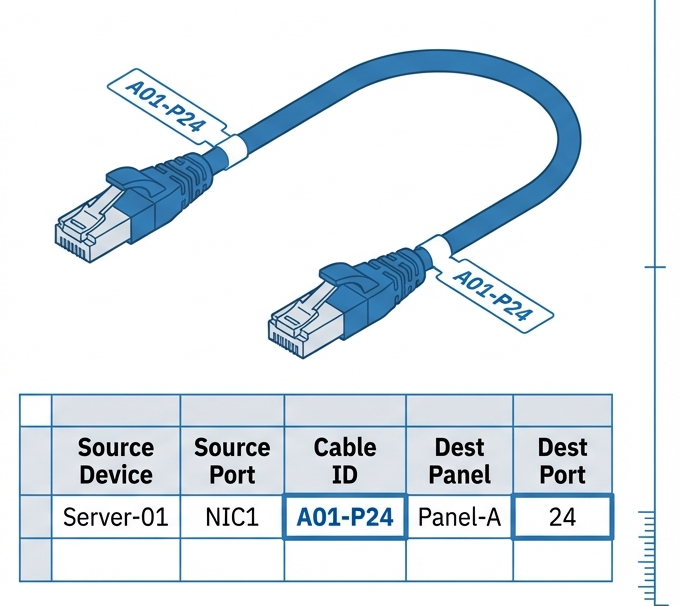
- Labeling is TIA-606 class-appropriate; both ends labeled; records maintained.
- Copper jumpers: Category 6A default; fiber: OM4 (MM) / OS2 (SM) as needed.
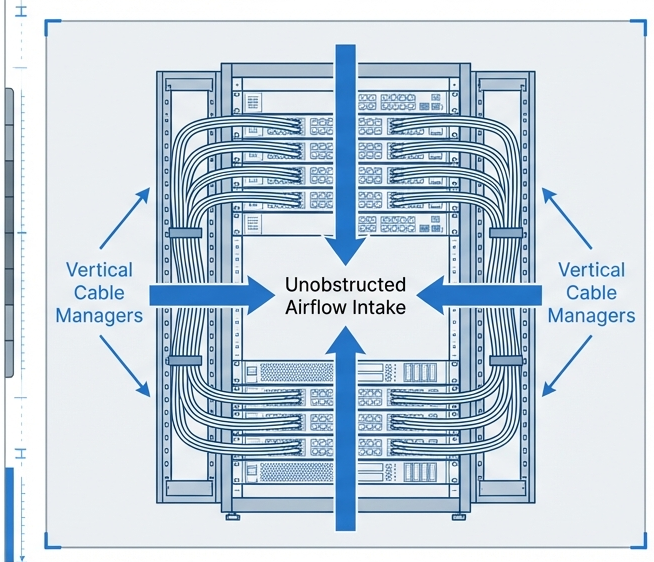
- Side vertical managers + horizontal managers; Velcro only (no overtight zip-ties).
Cooling
- Intake temperature measured at front-of-rack (server inlets).
- Paths for hot return are not short-circuiting into cold intakes; cable cutouts sealed with brush grommets.
1) Cable — label it, route it, don’t block the air
1.1 Administration & labeling (what to mark and how)
Adopt a 606-style plan sized to your site. In practice: label both ends of every patch cord and panel port, keep a port-to-port map, and color-code by function (server, storage, network, uplink) for at-a-glance troubleshooting. TIA’s administration standard has evolved (606-B/-B-1, with 606-E now in public review), so “606-compliant” means disciplined, end-to-end identification and records. (Source: Official TIA announcements; Updated: 2025-10.)
1.2 Patch vs. backbone, copper vs. fiber
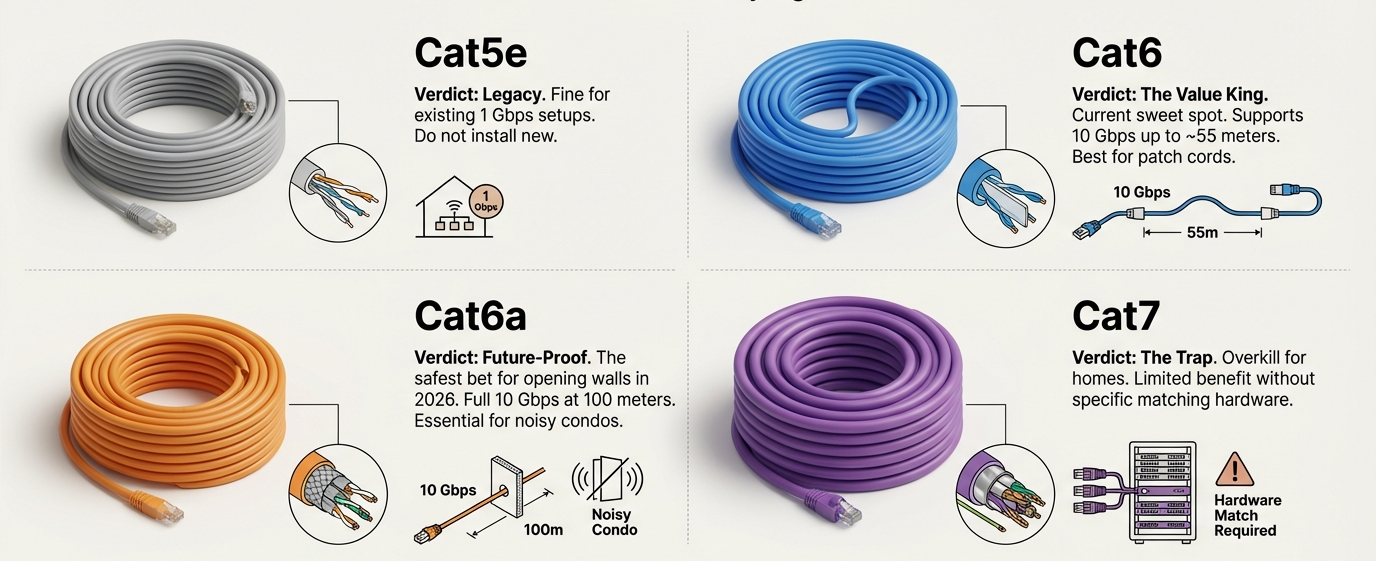
- Copper: Make Cat6A your default for rack-to-rack and high-EMI office environments. Use stranded jumpers for short patching inside the cabinet, solid for structured backbone. (Source: Structured cabling overviews; Updated: 2025-05.)
- Fiber: Standardize on OM4 for multimode (short-reach, 40/100G breakouts) and OS2 for single-mode (long-reach, future-proof). Keep polarity maps consistent (e.g., MTP-LC harnesses).
1.3 Airflow-friendly cable routing
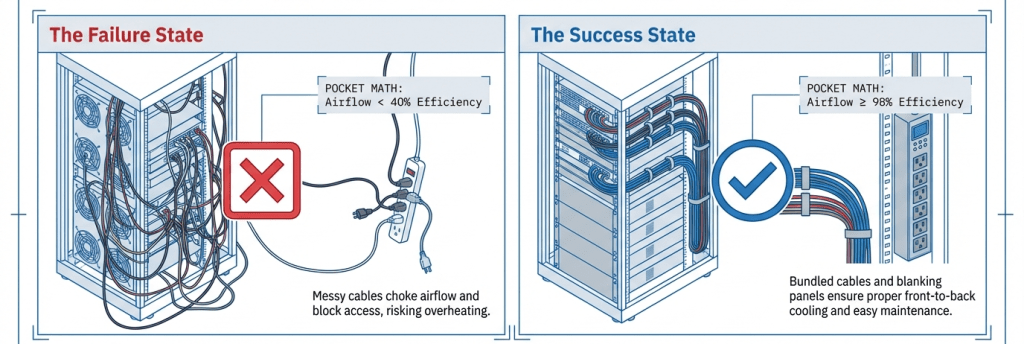
Cables shouldn’t form a “front grill.” Keep the face clean: patch cords exit horizontally to managers, then down/up through vertical managers. Route bulk slack on the sides, never bunched behind fans; seal floor/wall penetrations with brush grommets to stop bypass air. (Source: NRCan Best Practice Guide; Upsite airflow management notes; Updated: 2024-2026.)
In-Rack Cabling Self-Check
| Item | Recommended practice | Pass if… | Notes |
|---|---|---|---|
| Labeling | TIA-606 class-appropriate (both ends, port map) | Every jumper labeled both ends + record updated | Keep a living spreadsheet or DCIM |
| Copper | Cat6A default | No Cat5e/6 added to new runs | Mixed media is fine if documented |
| Fiber | OM4/OS2 | Min bend radius ≥ 10× OD | Use polarity labels on MTP/LC |
| Cable control | Vertical + horizontal managers | No cords draped across fans | Velcro only; no overtight zip-ties |
| Airflow | Brush grommets & blanking panels | No visible gaps; face neat | Prevent bypass and recirculation |
(Source: TIA admin/cabling references; NRCan airflow best practices; Updated: 2024-2026.)
2) Power — pick PDUs for Canada, size loads conservatively
2.1 Know your electrical context (Canada quick primer)
Typical small-site racks land on 120 V single-phase or 208 V single-phase/three-phase. Plugs/receptacles you’ll see: NEMA 5-15/20 (120 V), L5-30 (120 V locking), L6-20/30 (208 V single-phase), and IEC C13/C19 outlets on PDUs for IT gear. Equipment should carry CSA or cUL marks, and installations align with the Canadian Electrical Code (CEC) as adopted provincially. (Source: CSA C22.1 overview; Updated: 2024-2026.)

2.2 The 80% continuous-load principle (practical)
For branch circuits and PDUs, treat sustained IT loads as continuous and keep the calculated continuous load ≤ 80% of the overcurrent device rating—unless equipment is explicitly rated and installed for 100% continuous operation under the applicable rules. This conservative rule of thumb aligns with CEC Section 8 administration as explained by Ontario’s Electrical Safety Authority and expert commentary on CEC 8-104. (Source: ESA bulletin; CEC Section 8 guide; Updated: 2023-2024.)
2.3 PDU selection checklist (choose by branch & business need)
- Upstream branch: voltage, ampacity, breaker/receptacle type; locking plug needed?
- Outlet mix: C13/C19 ratio that matches servers vs. storage/network.
- Monitoring level: basic | input-metered | outlet-metered | outlet-switched (capacity planning, chargeback).
- Redundancy: dual PDUs on independent A/B sources; dual-corded gear split across PDUs.
- Form factor: 0U vertical vs. horizontal; input whip length; direction of cord exit.
- Compliance & environment: CSA/cUL certification; ambient temperature within rating.
Canada-Focused PDU Quick-Match Matrix
| Upstream branch | Typical wall receptacle | PDU input | Outlet types | Common use | Continuous-load reminder |
|---|---|---|---|---|---|
| 120 V / 15 A | 5-15R | 5-15P | C13 | Light network gear | Keep ≤ 12 A continuous |
| 120 V / 20 A | 5-20R | 5-20P | C13/C19 | Mixed SMB rack | Keep ≤ 16 A continuous |
| 120 V / 30 A | L5-30R | L5-30P | C13/C19 | Denser 120 V racks | Keep ≤ 24 A continuous |
| 208 V / 20 A | L6-20R | L6-20P | C13/C19 | Efficiency-minded racks | Keep ≤ 16 A continuous |
| 208 V / 30 A | L6-30R | L6-30P | C13/C19 | Higher density | Keep ≤ 24 A continuous |
| 208/120 V 3-phase | L21-20/30R | L21-20/30P | C13/C19 | Multi-device balancing | Phase-balance within 10–15% |
(Source: CSA/CEC context; ESA bulletin on continuous loading; Updated: 2024-2026.)
2.4 Quick capacity math (pocketable)
- Total power (W) = Σ(nameplate W) × concurrency factor (0.6–0.8 typical for SMB racks).
- Branch current (A) = Total W ÷ Line V.
- Continuous limit: keep at ≤80% of breaker/PDU rating unless 100%-rated gear/conditions apply.
- Three-phase balance: try to keep phase currents within 10–15% of each other for efficiency and headroom. (Source: ESA bulletin/CEC guidance; Updated: 2023-2024.)
PDU/Branch Capacity Self-Check
| Item | Calculation / threshold | Pass if… |
|---|---|---|
| Continuous current | I_cont ≤ 0.8 × I_breaker | Yes |
| Phase balance (3φ) | IA–IB | |
| Outlet headroom | After peak, ≥20% outlets unused | Yes |
3) Cooling — move heat out, don’t just stir it
3.1 Micro “cold/hot aisle” thinking for a single rack
Even one rack benefits from the same logic as a hall of racks: cold air in the front, hot out the back, and barriers that stop the two from mixing. Close off face gaps with blanking panels, seal cable holes with brush grommets, and keep the front face tidy so fans are pulling air—not fighting a cable curtain. (Source: NRCan Best Practice Guide; Upsite airflow guidance; Updated: 2024-2026.)

3.2 What inlet temperature to target
ASHRAE’s widely adopted guidance recommends server inlet temperature in the 18–27 °C band for most A-class IT equipment (with tighter bands for high-density classes). Staying near the high end of the recommended band reduces cooling energy without compromising reliability when the rest of the airflow is disciplined. (Source: ASHRAE TC 9.9 reference; Updated: 2024-2025.)
3.3 How much airflow (CFM) do you need?
Convert IT load (watts) to heat (BTU/h) with BTU/h ≈ W × 3.412, then estimate supply airflow:
CFM ≈ (BTU/h) ÷ (1.08 × ΔT °F)
Choose ΔT around 10–20 °F (≈5–11 °C) for a balance between fan power and temperatures. Validate with inlet sensors on upper/middle/lower RU and trim fans/tiles accordingly. (Source: ASHRAE materials; Updated: 2024-2025.)
Single-Rack Cooling Quick Calc (examples)
| Total IT power (W) | Heat (BTU/h) | Target ΔT (°F) | Needed CFM | Notes |
|---|---|---|---|---|
| 1,000 | 3,412 | 15 | ~210 | Small SMB rack |
| 2,500 | 8,530 | 15 | ~525 | Mid-density |
| 5,000 | 17,060 | 15 | ~1,050 | Higher density |
(Source: ASHRAE guidance on recommended envelopes; Updated: 2024-2025.)
3.4 Bypass & recirculation: fix the cheap stuff first
- Blanking panels in every empty RU.
- Brush grommets at roof/floor and cable pass-throughs.
- Keep front face clear; no cable “curtains.”
- Measure: log inlet temps (top/middle/bottom); watch for top-of-rack hotspots. (Source: NRCan Best Practice Guide; AC airflow notes.)
4) Canadian energy-cost cues (plan OpEx, not just CapEx)
Electricity price structure is provincial, and SMBs often have a choice among rate plans or have different commercial tariffs by load profile. In Ontario, small business customers can choose Time-of-Use, Ultra-Low Overnight, or Tiered pricing—good to know when scheduling backups or batch jobs. In Québec, Hydro-Québec publishes business tariffs and periodic adjustments; energy-intensive use may qualify for specific rates or programs. (Source: Official provincial pages; Updated: 2025-10 / 2025-04.)
Where available, check Natural Resources Canada resources for data-centre best practices and ENERGY STAR-aligned equipment guidance aimed at Canadian operators; these include airflow management basics (blanking plates, sealing openings) and broader efficiency playbooks. (Source: NRCan Best Practice Guide; Updated: 2025-12 / 2024.)
5) Wall-Mount Racks for Space-Constrained Canadian Installs
For small offices, retail back rooms, classrooms, or branch sites where floor space is limited, a 15U wall-mount network/server cabinet can simplify power, cooling, and cable discipline without overbuilding.
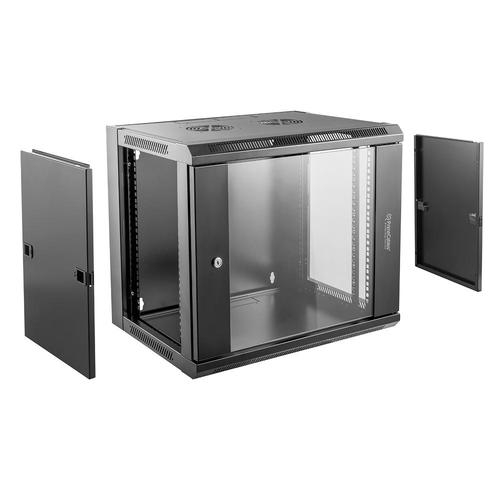
A compact option like the PrimeCables 15U Wall-Mount Network Server Cabinet is well-suited to housing switches, patch panels, small UPS units, and shallow servers in a single, enclosed footprint. Wall mounting keeps equipment off the floor (redug dust intake), while the enclosed frame supports front-to-back airflow planning, lockable access, and clean vertical cable drops to ceiling or wall pathways. When paired with properly rated PDUs and blanking panels, a wall-mount rack like this helps smaller Canadian deployments meet the same power-and-cooling best practices outlined in this checklist—just on a tighter spatial budget.
6) Rollout Day — a practical, step-by-step
- Site & airflow: Confirm front-to-back orientation for all devices; install blanking panels and brush grommets before gear arrives.
- Branch & PDU: Verify wall receptacle, breaker size, and PDU input; confirm CSA/cUL marks. Keep the planned load ≤ 80% of OCPD rating unless 100%-rated conditions are met.
- Managers & pathways: Mount vertical and horizontal managers; set “side channels” for bulk slack so the face stays clear.
- Rack & label: Rack gear heaviest first, then network toward the top for short, straight patching. Apply TIA-style labels to both ends as you go.
- Power up & measure: Power on in stages; record A/B currents, phase balance, and inlet temperatures.
- Cooling tune: Adjust fan speeds or CRAC/CRU setpoints to hold ~18–27 °C inlets; re-check top-of-rack.
- One-week review: Tighten anything that loosened, re-label any “temporary” jumpers, and save photos + a PDF of your port map.
FAQ
Q1) Do I really need “cold aisle/hot aisle” if I only have one rack?
Yes—treat the rack face as the “cold aisle” and the rear as “hot.” Use blanking panels and brush grommets to prevent bypass and recirculation; measure inlet temps to validate. (Source: NRCan Best Practice Guide; Updated: 2024.)
Q2) What is the simplest, safe rule for load sizing in Canada?
Unless you have 100%-rated equipment and conditions, keep continuous loads ≤ 80% of the breaker/PDU rating and document your math. (Source: ESA / CEC Section 8 guidance; Updated: 2023-2024.)
Q3) Cat6 or Cat6A for SMB racks?
Use Cat6A as the default—it improves headroom for PoE and higher data rates in noisy office environments. Keep jumpers stranded (flexible) and backbones solid (structured). (Source: TIA-568 overview articles; Updated: 2025-05.)
Q4) What inlet temperature should I aim for?
For most A-class IT gear, target 18–27 °C at the server inlets; staying closer to the warm side is usually more efficient if airflow is disciplined. (Source: ASHRAE TC 9.9; Updated: 2024-2025.)
Q5) Does labeling really pay off?
Absolutely. TIA-style administration (606) turns “mystery spaghetti” into predictable moves/adds/changes and faster incident response. (Source: TIA announcements; Updated: 2025-10.)
Q6) How do Ontario/Québec energy rates affect my rack?
Ontario small businesses can choose among TOU/ULO/Tiered price plans; Québec publishes business rates and seasonal adjustments. Consider scheduling backups outside peak windows. (Source: OEB; Hydro-Québec; Updated: 2025.)
Citations
- Canadian Electrical Code context; continuous-load practice
(Source: Official ESA bulletin on circuit loading “80% for continuous operation,” Updated: 2023-09.)
(Source: Expert guide to CEC Section 8 (8-104 continuous load ≤ 80% OCPD) interpretation, Updated: 2024-03.)
(Source: CSA C22.1:24 overview page, Updated: 2024-06.) - Cabling & administration references
(Source: TIA press/ballot notice for TIA-606-E (evolution of 606 series), Updated: 2025-10.)
(Source: Practical 606-B explainer, Updated: 2025-12.)
(Source: TIA-568 overview for connector/media context, Updated: 2025-05.) - Cooling best practices & temperature ranges
(Source: NRCan Best Practice Guide for Canadian Data Centres (airflow management: blanking plates, sealing openings), Updated: 2024-2025.)
(Source: ASHRAE TC 9.9 thermal guidelines (18–27 °C recommended), Updated: 2024-2025.) - Provincial energy cost context
(Source: OEB — electricity price plan options for small business, Updated: 2025-10.)
(Source: Hydro-Québec — business rates & adjustments, Updated: 2025-04/2026-01.)