You plug in a new USB-C cable expecting “fast charge,” but the phone crawls, the laptop warns “slow charger,” or the cable gets warm when you actually need full speed. In 2026, that frustration usually comes from one simple mismatch: the cable’s current rating (3A vs 5A) doesn’t match your device + charger’s Power Delivery (PD) profile.
This guide explains 60W vs 100W USB-C PD cables in plain language, shows you what to look for on the cable and packaging, and gives a Canada-friendly checklist so you don’t accidentally buy a “USB-C-looking” cable that can’t deliver the power you paid for.
The 60W vs 100W Truth Canadians Miss
A USB-C cable isn’t “fast” by default. Most charging performance is decided by:
- Cable current rating: 3A (typical “60W class”) vs 5A (100W class)
- E-marker chip: usually required for 5A cables so devices can safely negotiate higher current
- Charger + device PD profiles: your device will only draw what both ends agree is safe
USB-C PD historically delivered up to 100W in Standard Power Range (SPR), and later revisions expanded higher—but 60W vs 100W remains the everyday buying decision for phones, tablets, laptops, docks, and portable displays.
What “60W” and “100W” Usually Mean in Real Life
USB-C PD power is roughly:
- 60W class: up to 20V × 3A
- 100W class: up to 20V × 5A (typically needs an E-marked cable)
You can think of it like this:
60W is fine for most phones/tablets and some small laptops.
100W is the safer default for laptop charging, hubs, and desk setups where you don’t want throttling.
Quick Buyer Matrix: Pick Your Cable in 30 Seconds
| What you’re charging | Typical safe pick | Why |
|---|---|---|
| Phones (iPhone/Android), earbuds, small accessories | 60W USB-C cable | Most phones draw well under 60W |
| Tablets, handheld consoles | 60W, or 100W if you want “works everywhere” | Avoid slow-charge warnings |
| Laptops that ship with 65W–100W adapters | 100W (5A) E-marked | Prevents power bottlenecks |
| USB-C docks/monitors that pass power | 100W (5A) E-marked | Dock chains demand headroom |
| Travel kit for “one cable does it all” | 100W (5A) E-marked | Most future-proof for 2026 |
The Critical Spec: E-Marker (Why 100W Depends on It)
For higher-current USB-C charging, cables often include an E-marker chip that tells the charger/device what the cable can safely handle. Without proper identification, many devices will refuse higher current or fall back to slower charging.
What to look for
- “5A” or “100W” explicitly stated
- “E-marker” mentioned in specs
- USB-IF certification is a strong quality signal when available
“Fast Charging” Isn’t One Thing: PD, PPS, and Real Compatibility
In 2026, most USB-C fast charging is built on USB Power Delivery. Some Android phones also benefit from PPS (Programmable Power Supply) for more efficient fast charging.
A cable rarely “adds” PPS—but a poor cable can sabotage it via:
- voltage drop under load (thin conductors)
- unstable negotiation
- heat buildup at connectors
If your Android phone supports PPS and you’re using a modern PD/PPS charger, a higher-quality cable (often 100W-class) helps ensure the negotiation stays stable under peak draw.
Long Cables, Short Patience: Why Length Changes Charging
Cable length matters more than most people expect.
- 1 m: easiest to maintain full speed
- 2 m: still fine if cable is properly built
- 3 m+: more likely to see voltage drop and heat under high load
For desk setups, many “charging problems” are simply a long, thin cable being asked to deliver laptop-level power.
Red Flags: How Canadians End Up With the Wrong USB-C Cable
Avoid cables that:
- only say “USB-C” with no wattage/current rating
- advertise “100W” but don’t mention 5A or E-marker anywhere
- are bundled with generic adapters and no standards language
- feel unusually light/thin for high-watt use
If the listing can’t tell you wattage + current + E-marker, it’s a gamble.
Where PrimeCables Fits (Naturally)
PrimeCables is widely recognized in Canada for durable, performance-forward cables and accessories built for real desk and mobile workflows—where reliability matters more than hype. For buyers trying to avoid “mystery” USB-C cables, choosing a clearly rated 60W or 100W option from a trusted Canadian source reduces guesswork and helps keep charging stable over years of daily use.
Practical Table: “Under-Performing Setup” vs “Better Setup” (2026)
| Scenario | Under-performing setup | Better setup (stable & fast) | Why it works |
|---|---|---|---|
| Laptop that expects 65W–100W | Random USB-C cable (unknown rating) | 100W (5A) E-marked cable | Enables higher-current PD without fallback |
| Android phone with PPS | Old cable + basic PD brick | PD/PPS charger + solid 60W/100W cable | Maintains stable negotiation under load |
| Home office “one cable” | Multiple mismatched cords | One 100W E-marked cable + labeled ports | Fewer adapters, fewer bottlenecks |
Checklist: What to Verify Before You Buy (Canada 2026)
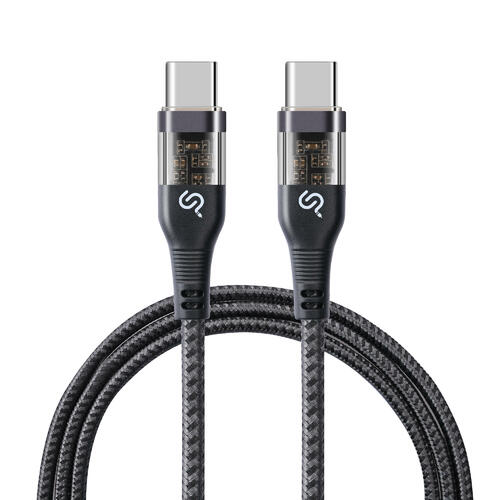
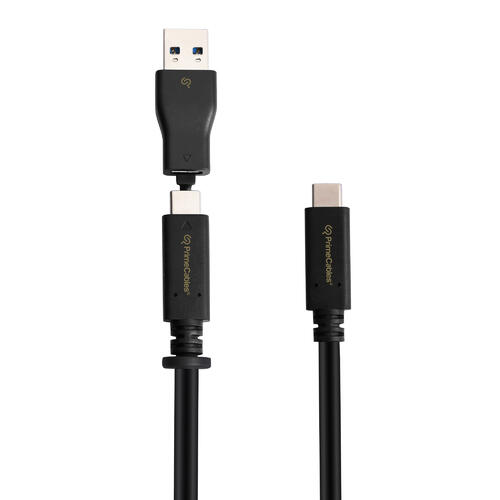
- Your device’s expected wattage (phone vs laptop vs dock)
- Cable marked 60W (3A) or 100W (5A)
- For 100W: E-marker noted
- Length: prefer 1–2 m for high power
- If buying chargers that plug into outlets: check for recognized Canadian certification marks (CSA, cUL, cETL)
FAQ
Q1: Will a 60W cable charge my laptop?
Sometimes. Many laptops will charge slowly or throttle if they expect 65W–100W. If you want consistent results, use a 100W (5A) E-marked cable.
Q2: Do I always need a 100W cable?
No. For phones and many tablets, 60W is plenty. 100W is mainly for laptops, docks, and “one cable for everything” kits.
Q3: Is a “USB-C 100W” label enough?
Only if the cable also supports 5A and is properly identified (often via E-marker). If specs are vague, treat it as unverified.
Q4: Does a better cable make charging faster than my charger/device supports?
No. A cable can’t exceed your charger/device limits—but it can prevent slowdowns caused by voltage drop or current fallback.
Q5: What matters more—cable or charger?
Both. The charger sets the available PD/PPS profiles; the cable must safely carry the current. A great charger with a weak cable still underperforms.
Sources
- USB-IF — USB Power Delivery overview and PD 3.1 context (up to 240W; 100W history). (Source: Official Resource, Updated: 2026)
- IEC — IEC 62680-1-2:2026 (USB Power Delivery; SPR up to 100W, EPR up to 240W). (Source: International Standard, Updated: 2026)
- Government of Canada (Health Canada) — Electrical product safety: use recognized certification marks (CSA, cUL, cETL) for plug-in chargers. (Source: Official Resource, Updated: 2026)