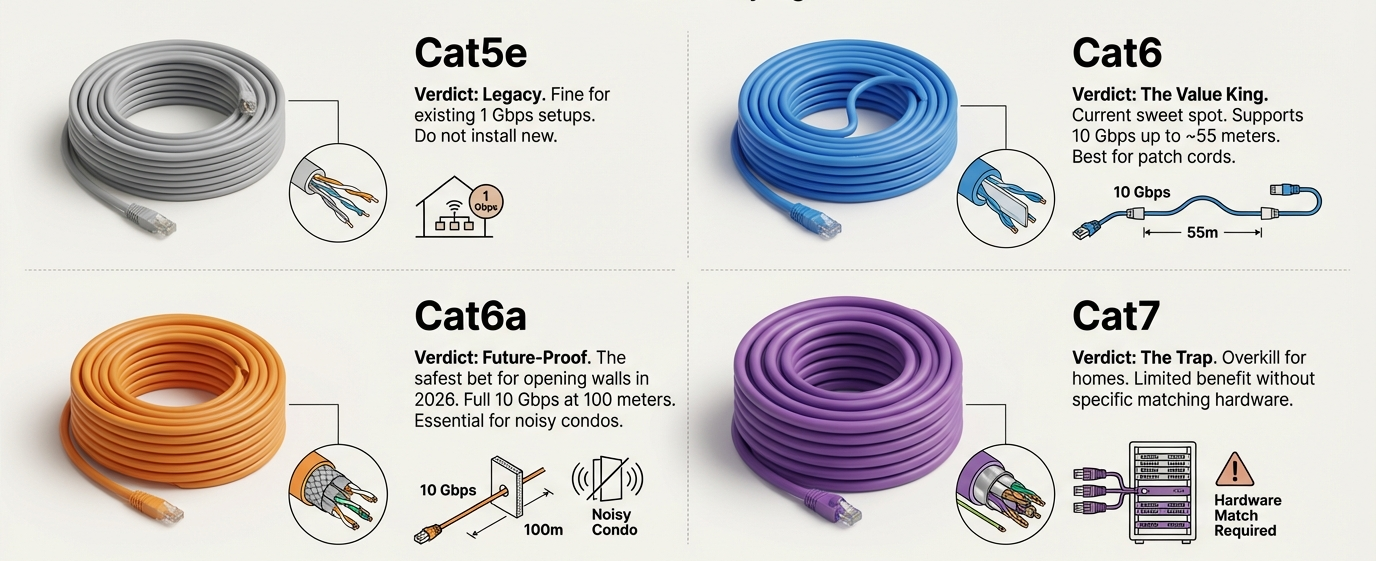
The short answer: pick the cable in this order. First decide whether you need a ready-made patch cable or bulk cable you cut and terminate yourself. Then choose the build (standard, slim or shielded), then the length, and finally check where the cable will run (inside a wall or outdoors). The ready-made cables in the examples below run from $2.55 to $14.99 at the lengths shown, and the two 1,000 ft bulk spools are $269.95 and $456.99, as of November 5, 2026.
If you already know whether you want Cat6, Cat6a or Cat8, our Cat6 vs Cat6a vs Cat8 guide covers that choice. This guide covers the questions that come after it: slim or standard, shielded or not, how long, and whether the cable can go in a wall or outside. You can browse everything on the Network Ethernet Cables page.
Step 1: Patch cable or bulk cable?
A patch cable arrives with an RJ45 connector on each end. Use it to connect a computer, console, printer or NAS to a router or switch, or to link a patch panel to a switch. Bulk cable is a spool of cable with no connectors. You cut it to length and terminate it yourself, which suits a fixed run inside a wall. The bulk product pages describe it as made for custom network installations where you cut lengths to your exact needs. You will also need connectors and a termination tool, so bulk is mainly for people who already do this work. Browse the bulk network cables if that is you.
Step 2: Standard, slim or shielded?
Standard patch cable
For a desk, a living room or a home office, a standard cable is usually all you need. The Cat6 24AWG Snagless UTP patch cable is listed as Cat6, UTP, 24AWG, stranded, with a snagless boot, up to 550 MHz.
Slim cable for crowded spaces
Slim cables are thinner and lighter, which makes them easier to route when many cables share one patch panel or switch. The GoSlim Slim Cat6 28AWG UTP cable page lists a 4 mm cable diameter against 6 mm for standard Cat6 patch cables. The GoSlim Cat6A 28AWG UTP cable is a Cat6A version, also 28AWG UTP. For very short jumpers, the FlexConnect Slim Cat6A 32AWG patch cord page lists a 3.0 mm cable OD, 32AWG, in lengths from 0.5 ft to 6 ft. Cable diameters are listed on each product page and differ slightly between pages, so check the one you choose.
Shielded cable
Shielding is intended to reduce electromagnetic and radio-frequency interference. The Cat6a SSTP 26AWG molded patch cable is SSTP, with a foil shield on each pair plus an overall braid, and molded strain-relief boots. The product page for a standard UTP cable states that either type should work for ordinary Ethernet connections. Shielding is worth a look if the cable runs beside power cables or other sources of interference, but check the page before assuming it fits your setup.
Step 3: Choose the length
Measure the path the cable will take, around corners and along the wall, not the straight line between the two devices. Add some slack so the cable is not pulled tight at the connectors. Then pick the nearest available length. Lengths differ by product:
- The standard Cat6 cable above is listed from 0.5 ft up to 100 ft, in single cables and in multi-packs.
- The GoSlim Cat6 cable is listed from 0.5 ft to 25 ft.
- The GoSlim Cat6A cable is listed from 6 inch to 50 ft.
- The FlexConnect Cat6A cord is listed from 0.5 ft to 6 ft.
- The shielded Cat6a cable is listed in sizes up to 100 ft. The description mentions lengths to 50 ft, so see the product page for the exact options.
Stock changes by length and colour, and some sizes may show as out of stock, so check the length you want on the page.
Step 4: Where will the cable run?
Patch cables are made for connecting equipment. If the cable runs inside a wall, look at bulk cable with the right rating on the page.
- In-wall and riser: the Cat6 23AWG UTP solid bulk cable, CMR rated, 1000 ft describes itself as CMR rated and suited to installations in a home or business, in riser installs and in walls, and states “For Use Indoor”.
- Outdoor and buried: the Cat6A 23AWG UTP solid bulk cable, UV / direct burial, 1000 ft is listed as UV / direct burial. The title says Cat6A while the description text refers to Category 6, so see the product page for the details before you plan the run.
Outdoor runs also involve conduit, grounding and local electrical or building rules. Check those requirements for your project, or ask a qualified installer, before you pull cable.
Examples at a glance
Prices are as of November 5, 2026. Each row shows one listed length as an example, so choose your own length on the page.
| Product | Type | Example length and price |
|---|---|---|
| Cat6 24AWG Snagless UTP patch cable | Cat6 UTP, 24AWG, standard | 10 ft, $3.65 |
| GoSlim Slim Cat6 28AWG UTP cable | Cat6 UTP, 28AWG, slim | 10 ft, $5.19 |
| GoSlim Cat6A 28AWG UTP cable | Cat6A UTP, 28AWG, slim | 10 ft, $4.56 |
| FlexConnect Slim Cat6A 32AWG patch cord | Cat6A UTP, 32AWG, slim | 3 ft, $2.55 |
| Cat6a SSTP 26AWG molded patch cable | Cat6a SSTP, 26AWG, shielded | 25 ft, $14.99 |
| Cat6 23AWG UTP solid bulk cable, CMR rated, 1000 ft | Bulk, CMR rated, indoor | 1,000 ft, $269.95 |
| Cat6A 23AWG UTP solid bulk cable, UV / direct burial, 1000 ft | Bulk, UV / direct burial | 1,000 ft, $456.99 |
A quick checklist before you order
- Patch cable or bulk? If bulk, do you have connectors and a termination tool?
- Does your gear need Cat6, Cat6a or higher? Read the page for the category and speed it states.
- Standard, slim or shielded for where the cable sits?
- Measured length, with a little slack.
- For in-wall or outdoor runs, the rating on the page and the rules for your project.
- Colour. Several of the cables above come in more than one colour, which can help you label different runs.
Once the cables are chosen, a tidy rack helps too. See our guide to choosing a 12U network cabinet.
Frequently asked questions
Is a slim Ethernet cable worse than a standard one?
The product pages describe slim cables as thinner and lighter and aimed at tight spaces such as patch panels. Compare the category (Cat6 or Cat6A) and the length range on the page rather than the thickness alone.
Do I need a shielded cable at home?
The standard Cat6 page says either shielded or unshielded cable should work for ordinary Ethernet connections. Shielded cable is intended to reduce interference, so it is mainly worth considering where interference is a concern.
Can I use a patch cable outdoors?
The patch cable pages above do not describe outdoor use. For outdoor runs, look at a cable that is listed for it, such as the UV / direct burial bulk cable, and read its page.
Can I put bulk cable inside a wall?
The CMR rated Cat6 bulk cable page lists installation in walls and riser installs. Check the rating on the page and the rules that apply to your building.
What length should I buy?
Measure the route, add a little slack, then choose the closest listed length. Very short cables suit rack and desk connections, and longer ones suit room-to-room runs.
Prices as of November 5, 2026. Check each product page for the current price, availability and specifications.