VR goggles get a lot of attention among gamers and video game markets. When they were released to market, VR glasses and VR goggles completely opened up new paradigms of gameplay and the possibilities of future games being more interactive.
Within the past year, a new VR accessory has come into play. We’re talking about foot motion controllers for VR. These are controllers that one puts their feet on, giving the gamer the opportunity to engage in a more precise and intuitive way.
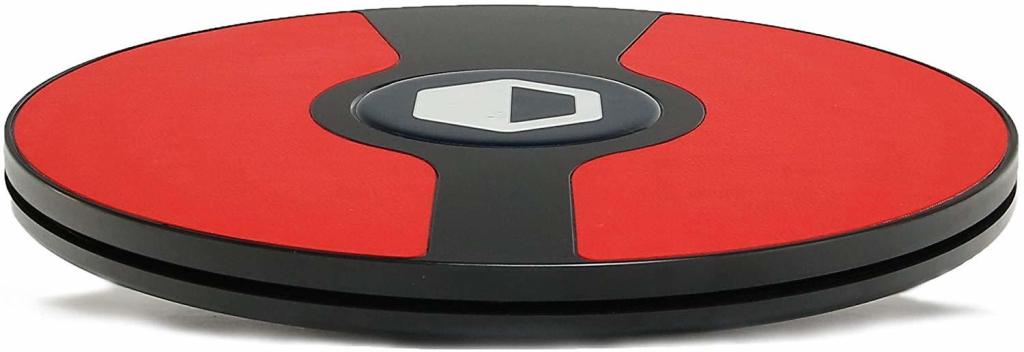
A foot motion controller gives you motion control in your games, unlike what was previously available. Move forward, go backward, turn, move up and down, adjust your speed, stop movement with ease. A controller allows you to do all this with so much ease.
The most popular foot controller in Canada is the 3dRudder. Fully compatible with the Oculus Rift, HTC Vive, and other standard PC games and applications, the 3dRudder is an adaptable controller.
Trying to juggle moving and action with your hand controller, you won’t have to anymore. The 3dRudder is the highest rated foot motion controller in Canada, bringing virtual reality to a new level.
First released last summer, the 3dRudder has proved invaluable to many users. It is fully compatible with a wide range of games. The number is still growing. A whole new era of virtual reality may have been ushered in with this accessory.
For those who haven’t seen it, the 3dRudder is a circular design. You rest your feet on it and as one leans or moves, your in-game character mimics what you’re doing on the foot motion controller. It’s the closest thing to lifelike foot motion that exists in the virtual reality arena.
In whichever direction you want to move in the game, just tilt your 3dRudder foot motion controller. If you want to move faster, just angle your tilt more. No sticks involved. No buttons.
All you have to do is plug it in through a USB connection. The 3dRudder will fit into almost any console, as long as there’s a USB port to connect to. The design also contains internal measurement units (IMUs) and pressure sensors which helps to translate everything you’re doing into your game.
Learning how to use a foot motion controller isn’t quite like learning how to walk but it’s close. Fortunately, after about 20 minutes of playing, most have become experts in using their foot controller. It doesn’t take long. This will free up your hands while you fully immerse yourself into a gaming experience. Get yours today.
Featured photo by David Dvořáček on Unsplash