A great Macbook Pro Thunderbolt 3 adapter can help connect devices like iPhones, displays, hard drives, and more with fast sync and charge capabilities. Searching out an adapter like this can be quite expensive though, especially if you’re seeking something high quality.
All of the hoopla surrounding USB Thunderbolt adapters are based around recent modifications to the Macbook Pro design. The new Macbook Pro comes with Thunderbolt 3 ports of only one type, meaning compatibility is only USB-C. That cuts down a lot on what can be connected. If your devices have USB-A, Thunderbolt 1, Thunderbolt 2, DisplayPort, HDMI, or another type of connection, you’ll need an adapter to connect. Apple doesn’t include any adapter of the sort with a Macbook, putting it on the customer to find their own. Thankfully, PrimeCables can help.
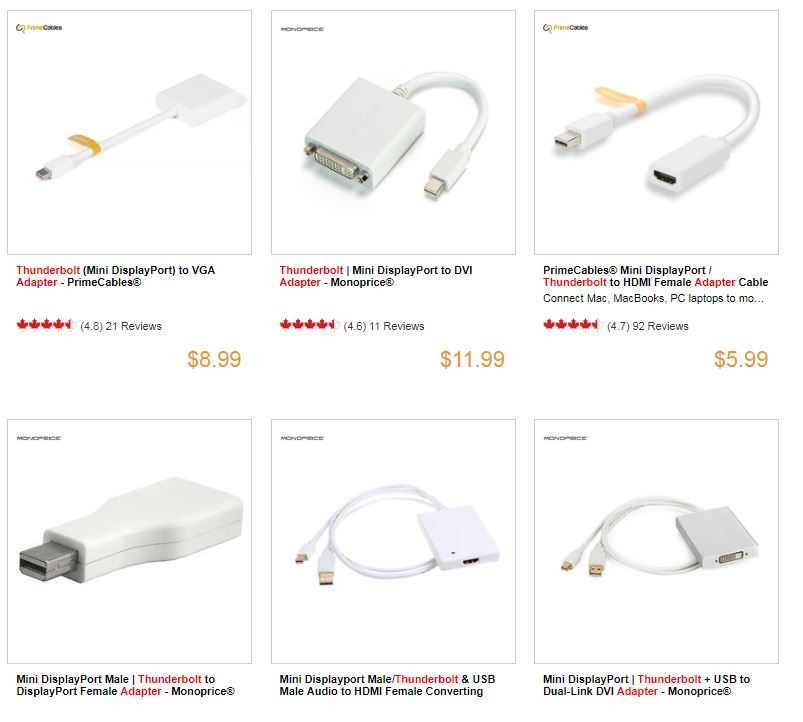
PrimeCables has several adapters in its catalogue including a Thunderbolt Mini DisplayPort to VGA for $8.99, a Thunderbolt Mini DisplayPort to DVI adapter for $11.99, a DisplayPort Thunderbolt adapter to HDMI for $5.99, a Mini DisplayPort Thunderbolt and USB to HDMI female adapter for $49.99, and a Mini DisplayPort Male Thunderbolt to DisplayPort to $9.99.
There are more than a dozen additional adapters that would work great with Macbook Pro Thunderbolt 3. As long as you shop with PrimeCables, you won’t need to set aside any considerable amount of cash to pick up an adapter alongside your new Macbook Pro purchase.
Using PrimeCables adapters, you can connect almost anything to your Macbook Pro using a Thunderbolt 3 connection. Connect USB-C devices, USB-A devices, micro B SuperSpeed USB, iPhones, iPads, lightning earpods, headphones, Thunderbolt devices, DisplayPort, HDMI, DVI, VGA, Ethernet, SD cards, FireWire devices, printers, and more.
Any time you’re buying an adapter, ensure it’s from a reputable source. You don’t want to put your devices at risk going with a low quality product. With PrimeCables, you can always trust us to deliver a high quality product that’ll get the job done!
Regarding a Thunderbolt adapter purchase, know what you’re looking to connect. Consider all the devices you may want to use. The ultimate Macbook Pro setup might just be a few PC accessories away. If you need something with a mix of connections, you may want to purchase a multi-purpose adapter or go with multiple inexpensive adapters. Feel free to jump on board with PrimeCables and browse our guide of different Thunderbolt adapter products. What you need might be right around the corner.