An adjustable CPU mount keeps your computer safer, your workspace cleaner, and your body more comfortable. By lifting the CPU off the floor and allowing flexible under-desk or wall installation, it improves airflow, protects against dust and spills, and frees up valuable desk space—especially in modern home offices and professional workstations.
Quick Takeaways
- Better airflow & cooling → fewer overheating issues
- Cleaner workspace → no bulky tower on the floor or desk
- Improved ergonomics → easier access without awkward bending
- More protection → less dust, fewer spills, reduced impact risk
- Flexible setup → adjustable mounts fit different CPU sizes and layouts
The real problem most workspaces ignore
Here’s the thing most people don’t think about until something goes wrong.
You spend good money on a computer. Then you stick it on the floor—right where dust collects, cables get kicked, and spilled coffee travels fastest.
I’ve seen it in home offices, small businesses, and even polished corporate setups. Beautiful desk. Ergonomic chair. Dual monitors on arms.
And then… a $2,000 CPU sitting naked on the carpet.
That’s where adjustable CPU mounts quietly earn their keep.
They’re not flashy. They don’t boost FPS or add RGB lighting. But they solve real, everyday problems that shorten hardware life and wreck workspace flow.
Let’s unpack why adjustable CPU mounts—especially under-desk and wall-mounted options—are one of the smartest, most overlooked upgrades you can make.
What is an adjustable CPU mount ?
An adjustable CPU mount is a bracket or frame designed to securely hold a desktop computer tower while allowing:
- Width and height adjustment for different CPU sizes
- Easy access for maintenance
- Flexible positioning under a desk or on a wall
Unlike fixed mounts, adjustable versions adapt as your setup changes. Swap computers? Reconfigure your desk? Raise or lower a sit-stand desk?
You don’t have to start over.
That flexibility matters more than people realize.
Why keeping your CPU off the floor actually matters
1. Dust buildup is a silent killer
Let me be blunt: floors are filthy.
Even clean offices accumulate dust, pet hair, and debris near ground level. Your CPU’s intake fans pull that straight inside.
I’ve opened towers that looked fine on the outside but were caked internally. Fans struggling. Heat trapped. Performance throttled.
Raising the CPU—even a foot or two—dramatically reduces how much debris gets sucked in over time.
2. Spills happen faster than you think
It’s never intentional.
A knocked-over mug. A water bottle leak. A cleaning mishap.
When your CPU is on the floor, there’s zero margin for error.
Under-desk or wall-mounted CPUs sit above the danger zone, giving you protection that a surge protector alone can’t offer.
3. Fewer accidental impacts
Rolling chairs. Footrests. Vacuum cleaners. Moving boxes.
All things I’ve seen slam into floor-mounted towers.
Mounting your CPU eliminates those accidental hits completely.
Benefits of an under-desk adjustable CPU mount

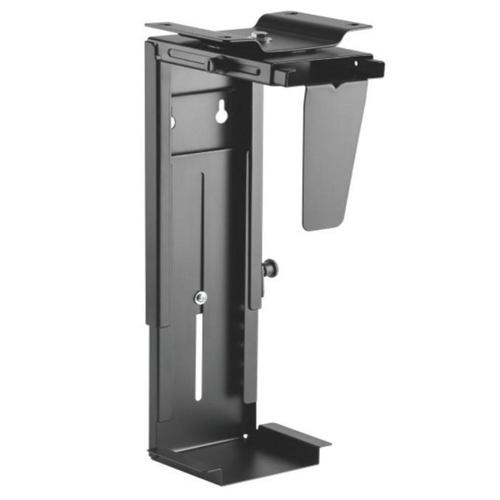
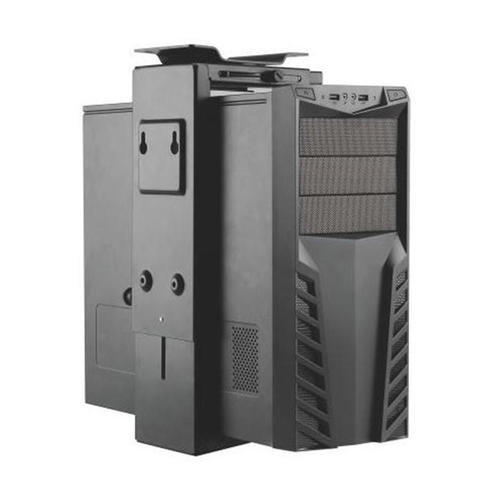
An under-desk adjustable CPU mount frees up desk and floor space while keeping your computer accessible, protected, and aligned with ergonomic movement—especially useful for sit-stand desks.
Now let’s break down why that matters in real life.
1. Cleaner desk, clearer mind
This surprises people every time.
Removing the CPU from sight instantly makes a workspace feel calmer and more intentional. No bulky black box interrupting the visual flow.
You gain:
- More legible space
- Better cable routing
- A workstation that feels purpose-built, not improvised
That psychological benefit is real—especially if you work long hours.
2. Perfect companion for sit-stand desks
This is where adjustability really earns its value.
With a fixed CPU on the floor:
- Standing up stretches cables
- Ports become harder to reach
- Stress builds at connection points
An adjustable under-desk mount moves with the desk, maintaining:
- Proper cable slack
- Stable airflow
- Consistent access height
I’ve watched people troubleshoot “mysterious” display dropouts that vanished once the CPU was mounted properly under a sit-stand desk.
3. Easy access without crawling
Here’s a small thing that makes a big difference.
Need to:
- Plug in a USB?
- Swap a cable?
- Power-cycle the machine?
An under-desk mount keeps the CPU within arm’s reach—no kneeling, no awkward twisting.
Once you experience that convenience, it’s hard to go back.
Benefits of wall-mounted adjustable CPU installation
Wall-mounted adjustable CPU mounts maximize floor space, enhance airflow, and offer superior protection in compact or high-traffic environments.
Wall mounting isn’t for everyone—but when it fits, it’s incredibly effective.
1. Maximum space efficiency
In tight offices, studios, or shared workspaces, floor space is premium real estate.
Wall mounting:
- Clears walking paths
- Keeps equipment out of traffic zones
- Makes small rooms feel noticeably larger
I’ve seen this transform cramped editing rooms and classrooms almost overnight.
2. Excellent airflow
Mounted correctly, wall installations often provide better airflow than floor placement.
Why?
- Less dust intake
- Unobstructed ventilation paths
- Reduced heat recirculation
Just make sure:
- The mount allows rear and side clearance
- Intake and exhaust vents aren’t blocked
Adjustable mounts make this much easier to dial in.
3. Added security in shared spaces
In offices, labs, or public-facing environments, wall-mounted CPUs are:
- Harder to tamper with
- Less likely to be unplugged
- Safer from accidental damage
For IT managers, that peace of mind alone is worth the installation.
Adjustable vs fixed CPU mounts: what most buyers miss
| Feature | Adjustable CPU Mount | Fixed CPU Mount |
|---|---|---|
| Fits multiple CPU sizes | ✅ Yes | ❌ Limited |
| Works with sit-stand desks | ✅ Yes | ⚠️ Often no |
| Easier upgrades | ✅ Yes | ❌ No |
| Better resale value | ✅ Yes | ❌ No |
| Long-term flexibility | ✅ High | ❌ Low |
Here’s the truth:
Most people outgrow fixed mounts faster than they expect.
New PC. Desk change. Office move.
Adjustable mounts absorb those changes without extra cost.
Ergonomics: the benefit nobody advertises enough
This part catches people off guard.
While CPU mounts aren’t “ergonomic equipment” in the traditional sense, they remove ergonomic friction.
- No bending to reach ports
- No twisting to hit power buttons
- No cable strain pulling devices out of alignment
Small reductions in daily friction add up over months of work.
Cable management gets dramatically easier
If you care about clean cable runs (or just hate chaos), CPU mounts help more than cable trays alone.
Mounted CPUs allow:
- Shorter, more direct cable paths
- Fewer cables touching the floor
- Easier labeling and organization
Once cables are suspended and routed intentionally, troubleshooting becomes faster and less frustrating.
Are there any downsides? Let’s be honest.
Yes—but they’re manageable.
Potential drawbacks:
- Installation takes time
- Wall mounts require proper anchors
- Poor-quality mounts can sag
How to avoid problems:
- Choose mounts rated for your CPU’s weight
- Look for metal construction and locking adjustments
- Measure clearance before drilling
When installed correctly, issues are rare—and the benefits far outweigh the setup effort.
Who benefits most from adjustable CPU mounts?
- Remote workers building long-term home offices
- Gamers with large towers and multiple peripherals
- Creative professionals who reconfigure setups often
- Businesses optimizing shared workspaces
- Standing desk users who need moving alignment
If you plan to keep your workstation longer than a year, an adjustable mount is usually worth it.
A quick real-world scenario
A small design firm upgraded to sit-stand desks but left CPUs on the floor.
Within weeks:
- Cables pulled loose
- Fans clogged faster than usual
- Staff complained about awkward access
After installing adjustable under-desk mounts:
- Cable issues stopped
- Cleaning time dropped
- Desk transitions became seamless
No performance upgrade. Just smarter placement.
That’s the kind of quiet win CPU mounts deliver.
Practical checklist before buying
Before choosing an adjustable CPU mount, confirm:
- CPU weight (with accessories)
- Width and height range compatibility
- Mounting surface strength
- Clearance for ventilation
- Desk movement (fixed or sit-stand)
Five minutes of measuring saves hours of frustration later.
FAQs
Is an adjustable CPU mount safe for heavy gaming PCs?
Yes—if the mount is rated for the weight. Many adjustable mounts support 30–50 lbs. Always check specs and mounting hardware quality.
Does wall mounting affect CPU cooling?
Not negatively when installed correctly. In many cases, airflow improves due to reduced dust and better vent clearance.
Can I install a CPU mount myself?
Most under-desk mounts are DIY-friendly with basic tools. Wall mounts may require anchors or studs for safety.
Will a CPU mount work with any desk?
Adjustable mounts fit most desks, but always check thickness, material, and clearance—especially with glass or thin composite desks.
Is it worth it for home offices?
Absolutely. Home offices often have less space and more foot traffic—exactly where mounts shine.