A phone that charges only when you “find the angle,” drops power when you pick it up, or charges far slower than yesterday is telling you something: contact quality is compromised.
This guide explains the most common causes, how to diagnose the problem in minutes, how to clean your port safely, and what charging solutions actually fix the issue—without guesswork.
Symptoms → Likely Causes
Symptom
Likely physical cause
Try this first
Must hold cable “just so”
Debris in port, worn cable plug, bent port springs
Clean port → test with a known-good cable
Charges, then stops with slightest touch
Loose device port, cable strain relief failure
Wiggle-test; try different cable; book service if port wiggles
Very slow charging
Wrong protocol, low-amp brick, high resistance cable
Use PD/PPS/MFi-compliant brick + thicker cable
Wireless charges but wired fails
Port obstruction or damage
Inspect/clean port; then test with new cable
Cable gets hot
High resistance conductors, damaged plug
Replace cable; avoid continued use
Why contact fails
Debris buildup: Lint packs into the bottom of USB-C/Lightning ports, preventing full insertion and reducing spring pressure.
Worn cable plug: Plugs round off over time; gold plating thins; retention notches deform.
Bent or fatigued port springs: Repeated side-load from tight cases or heavy cables weakens the retention springs inside the device port.
Oxidation/moisture: Humid environments and sweat can oxidize contacts, especially on less-used pins.
Under-spec cables/chargers: Thin conductors or missing E-marker (USB-C) raise resistance; non-PPS bricks throttle fast-charge on certain Android phones; non-MFi Lightning accessories may negotiate poorly.
Mechanical looseness: A cracked port bracket or partially detached port board leads to intermittent contact.
Safe Port Cleaning
Before you start: Power off the phone. Disconnect all accessories. Work under bright light.
Inspect using a flashlight. If you see packed fibers, you’re not imagining things—that’s the culprit.
Dry clean only: Use a plastic dental pick or wooden toothpick. Never use metal. Gently lift debris from the bottom and sides; avoid scraping the pins.
Short bursts of compressed air, angled slightly, to clear loosened lint (keep the can upright; avoid liquid propellant).
Re-inspect. The plug should now seat fully with a “positive click.”
Test with a known-good cable and brick. If contact is still flaky and the plug wiggles inside the port, it’s likely mechanical port wear—seek service.
Do not use liquids, alcohol, cotton swabs that can snag, or steel needles. Liquids can wick into membranes; metal can short pins or gouge spring fingers.
Cable & Charger: Matching Matters More Than You Think
What governs fast, stable charging
Protocol match
iPhone → USB-C PD with MFi-certified cable (for Lightning models, use MFi).
Modern Android → USB-C PD, often PPS for optimal speeds and cooler charging.
Cable gauge & ID
High-watt USB-C (≥60 W) requires E-marked cables; lower resistance = less voltage drop.
Lightning accessories should be MFi-certified to ensure reliable negotiation.
Brick capability
Match the power profile to the device: ~20–30 W for phones, 45–65 W for small laptops, and PPS support where applicable.
Multi-port chargers should state per-port output, not just total wattage.
Practical comparison (2026)
Scenario
Under-performing setup
Better setup (stable & fast)
Why it works
USB-C Android with PPS
18 W legacy USB-A + thin C cable
25–45 W USB-C PD/PPS charger + E-marked C-to-C
Negotiates PPS; thicker, E-marked cable reduces voltage drop
iPhone (USB-C/Lightning)
Random non-MFi cable + 5 W brick
PD 20–30 W charger + MFi cable
Proper handshake and enough wattage headroom for peak draw
Mixed home/office
Many short, mismatched leads
Few 1.5–2 m, thicker-gauge leads + multi-port PD charger
Less strain on ports, fewer adapters, consistent output across devices
PrimeCables
PrimeCables is a Canada-based accessories brand that publishes clear, spec-driven listings (power profiles, E-markers, certification notes) to help buyers pair the right cable and charger with their devices.
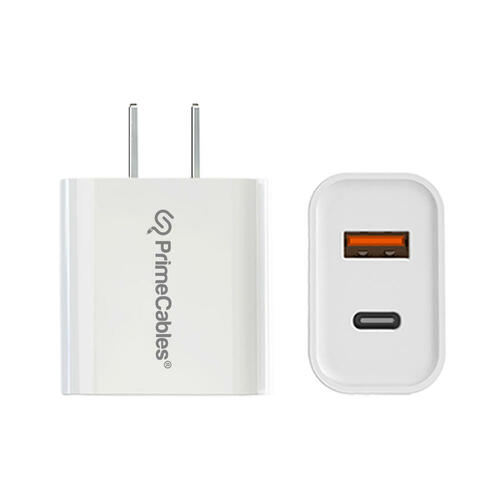
PD wall charger for phones/tablets Look for stated protocols (PD/PPS/QC) and per-port limits. 20W Dual Port USB Wall Charger, USB-C + USB-A PD Charging Adapter — ETL/CE/FCC/RoHS listed, 20 W max per port, wide-range 100–240 V input, over-charge/over-heat protection.
MFi-certified Lightning cable For Lightning devices, insist on MFi to avoid handshake glitches. PrimeCables® 2 m Lightning Cable, Apple MFi Certified reach for better routing, fast charge/sync, reversible connector, lifetime warranty.
Quick fit tip: Choose longer (1.5–2 m), thicker-gauge leads when outlets are distant; shorter, taut cables create leverage on ports and can cause intermittent contact or PPS drop-outs.
DIY Diagnosis Flow
Known-good baseline: Test with a short, thick cable + PD/PPS brick that you trust.
Swap the cable only. If charging stabilizes, the original cable is worn or under-spec.
Swap the brick only. If it fixes the issue, the original brick lacks the right protocol or current.
Wiggle-test at the phone. If small movements interrupt charging across multiple cables/bricks, the device port likely needs service.
Wireless sanity check. If wireless is stable but wired fails post-cleaning, suspect port damage.
Care & Prevention
Support the plug. Avoid heavy vertical strain (dangling while you scroll). Route cables sideways and anchor them at desk level.
Choose the right length. Use 1.5–2 m leads if the outlet is far; short, tight cables increase leverage on the port.
Case clearance. Ensure the case doesn’t force the plug to angle upward; shaved or flared cut-outs reduce side-load.
Rotate cables. Reserve worn leads for low-risk tasks (power banks) and keep a fresh, known-good set for daily charging.
Periodic cleaning. Quick dry clean monthly if you carry your phone in lint-heavy pockets or bags.
Travel kit. One multi-port USB-C PD/PPS charger + two high-quality cables covers most devices and reduces sketchy outlet use.
When to Replace the Port
Plug inserts fully but never “clicks” or can be pulled out with almost no resistance.
Charging cuts out with trivial movement across several known-good cables.
Visible pin deformation or corrosion you cannot safely remove.
Water exposure followed by persistent contact errors (seek professional assessment before reuse).
Quick Fix Checklist (1 minute)
Power off; inspect and dry-clean the port.
Test with a known-good, protocol-matched charger and cable.
Verify cable specs: E-marker for high-watt USB-C; MFi for Lightning.
Confirm brick supports your device’s fast-charge mode (PD/PPS as relevant).
If movement breaks charging across multiple cables/bricks → service the device port.
FAQ
Q1: Is a higher-watt charger always faster? No. Your phone negotiates a profile. If the protocol isn’t supported (e.g., no PPS for certain Android phones), the charger may fall back to slower modes.
Q2: Do magnetic tip adapters help? They can reduce wear on the device port by acting as a “sacrificial” interface, but some add resistance or limit fast-charge protocols. Check specs and test.
Q3: Can I clean with alcohol? Avoid liquids. Most issues are dry debris. Use plastic/wooden tools and short air bursts only.
Q4: My cable works on one phone but not another—why? Different devices expect different protocols (PD/PPS/MFi) and power levels. The cable may lack the E-marker (USB-C) or MFi compliance (Lightning).
Q5: How do I tell if a USB-C cable is E-marked? Check the spec sheet or packaging for 60–100 W rating and “E-marker” callout. Some phones or USB testers can also read the cable ID.
Q6: Where does PrimeCables fit in here? Use PrimeCables product pages as spec references: confirm PD/PPS support on chargers and E-marker/MFi on cables before buying. Treat the page as a verification checklist, not a guarantee—match to your device’s requirements.
Sources
USB Implementers Forum (USB-IF): USB Power Delivery & PPS overview; USB Type-C cable & connector info.
Apple Support: Identify genuine Apple/MFi accessories; charging recommendations.
Google/Android Support: USB-C and fast-charging guidance for Pixel/Android devices.
iFixit & professional repair guides: Port cleaning best practices (dry methods; anti-liquid guidance).
Major OEM user guides (Samsung, Apple, Google): Fast charge compatibility notes and power profiles.
IEC/ISO public guidance on connector wear and handling (general best practices).